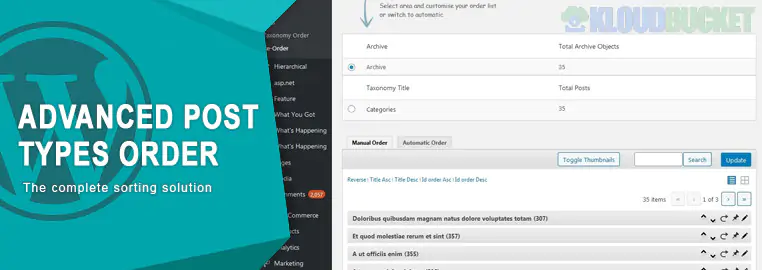
Advanced Post Types Order is the premium version of the highly popular Post Types Order plugin by Nsp Code. While the free version allows simple drag-and-drop reordering of posts, the Advanced version is designed for complex websites with multiple custom post types, large databases, and specific sorting needs.
Hierarchical Support: Unlike the free version, the Advanced version allows you to reorder hierarchical post types (like Pages or nested Custom Post Types) with a clean tree-view interface.
Automatic Sorting: You can set "Auto-Sort" rules to automatically organize posts by criteria such as:
Post Title (Alphabetical)
Creation Date or Modified Date
Post ID or Post Author
Custom Field Values (e.g., sorting by price or a custom numeric rating).
Taxonomy-Specific Ordering: Allows you to create different orders for the same posts depending on the category or tag. For example, a "Product" can be 1st in the "Electronics" category but 5th in the "Sale" category.
Multiple Sort Lists: You can create and save multiple "Sort Lists" and apply them to specific areas of your site using conditionals or shortcodes.
Mobile-Ready Interface: Includes a responsive drag-and-drop interface that works smoothly on tablets and mobile devices for on-the-go management.
Large Dataset Handling: Features a pagination system in the re-order interface to handle thousands of posts without crashing your browser.
Feature
Post Types Order (Free)
Advanced Post Types Order (Pro)
Drag-and-Drop
Basic List
Enhanced Tree-View & Grid
Hierarchical Types
No
Yes
Auto-Sort Rules
No
Yes
Category/Tag Sort
No
Yes
Conditionals
No
Yes (Apply only to specific queries)
WPML/Multilingual
Limited
Full Support
The plugin uses the built-in WordPress menu_order parameter.
Automatic Mode: If "AutoSort" is ON, the plugin intercepts the query and applies your order automatically across the site.
Manual Mode: For developers who want more control, you can apply your custom order in a standard WP_Query by using:
PHP
'orderby' => 'menu_order', 'order' => 'ASC'
WooCommerce Stores: To precisely control the sequence of products on shop and category pages.
Portfolio Sites: To highlight your best work at the top regardless of when it was published.
Documentation/LMS: To ensure lessons or help articles appear in a logical step-by-step sequence.
Real Estate/Listings: To sort properties by price or status using custom meta fields.
The plugin is available as a one-time purchase or through a subscription from the official Nsp Code website.
Install: Upload the .zip file to your WordPress "Plugins" section.
Configure: Navigate to Settings > Post Types Order to choose which post types should be orderable.
Re-Order: Go to the specific Post Type menu (e.g., Products > Re-Order) to begin dragging items into place.
Would you like me to help you set up a custom "Auto-Sort" rule for a specific custom field, or are you looking for help with the conditional settings?
.jpg) Help Us to Buy More New Theme/Plugin
Help Us to Buy More New Theme/Plugin
Published:
Dec 30, 2025 17:24 PM
Category:
Author:
OtherLicense:
GPL v2 or LaterTags: