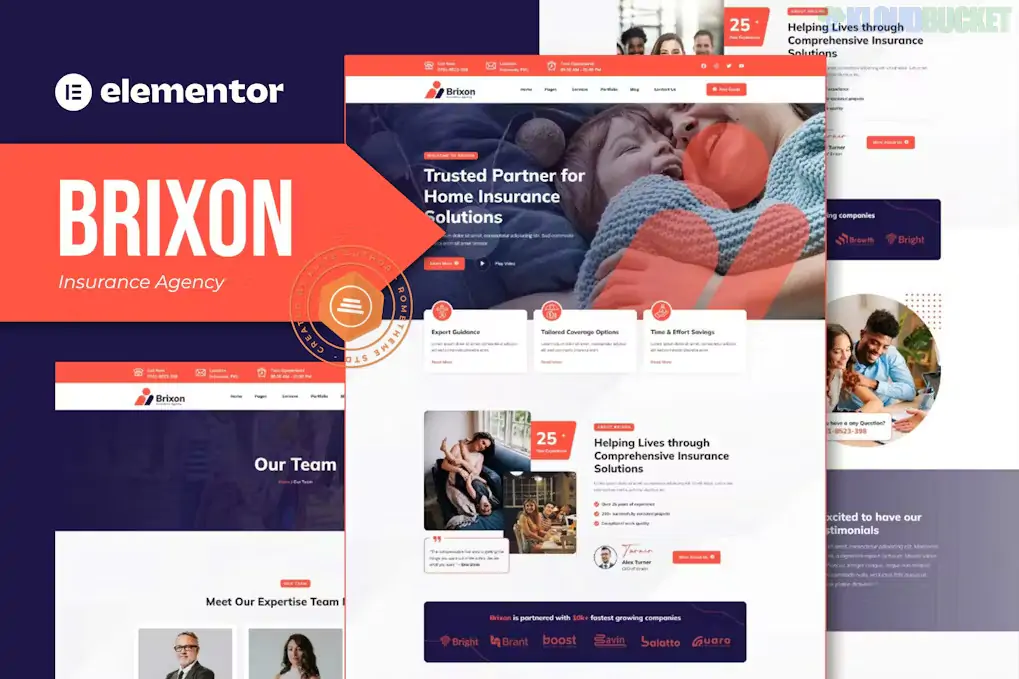
Brixon is a modern and professionally designed Elementor Template Kit specifically created for insurance agencies, financial consultants, and corporate firms. Developed by Rometheme, it provides a high-trust visual language that helps agencies outline complex insurance policies (like life, health, or travel) in a clear, accessible way.
Unlike a standalone theme, Brixon is a set of pre-designed layouts that you import into a lightweight foundation (like the Hello Elementor theme) to build a fully functional website.
14+ Pre-built Templates: A comprehensive collection covering every business need:
Homepage: A professional, lead-focused landing page with distinct service areas.
Services & Service Details: Specialized templates to categorize different insurance products.
Agent Profiles: To build trust by introducing your qualified team.
FAQ & Contact: Essential layouts for answering customer queries and capturing leads.
No Elementor Pro Required: Brixon is built using free plugins, meaning you don't need a paid Elementor subscription to achieve the demo's exact look.
100% Fully Responsive: Manually optimized to ensure policy details and contact forms are easy to read on smartphones and tablets.
Global Kit Styles: Easily change the entire firm's brand colors and typography sitewide with a single click in the Global Settings.
Flexbox Container Optimized: Updated for the latest WordPress and Elementor standards to ensure fast loading speeds and modern layout control.
Feature
Details
Developer
Rometheme
Type
Elementor Template Kit
Required Foundation
Hello Elementor (Free)
Required Plugins
Elementor (Free), RomethemeKit, RomethemeForm, ElementsKit Lite
Latest Status
Active (Maintained for WordPress 6.7+ and PHP 8.3)
Performance
Optimized for Core Web Vitals and SEO-friendly indexing
To ensure Brixon looks exactly like the professional demo, follow this specific import sequence:
Preparation: Activate the Hello Elementor theme and set your permalinks to "Post Name."
Plugin Setup: Install Elementor, Envato Elements, and the required Rometheme addons mentioned above.
The Import:
Go to Elements > Installed Kits and upload the Brixon zip.
Crucial: Import the Global Kit Styles first. This sets your primary colors and typography for all subsequent pages.
Import individual page templates (Home, About, etc.) one by one.
Header & Footer: Use RomethemeKit to assign your imported header and footer templates to the "Entire Site."
General Insurance Agencies: Handling diverse portfolios like Home, Auto, and Life insurance.
Financial Advisory Firms: Providing consulting services alongside insurance product sales.
Niche Insurance Providers: Excellent for Islamic Travel, Hajj, or Umrah insurance specialized services.
Independent Agents: Ideal for building a personal brand with a high-end "Big Agency" aesthetic on a budget.
Pro Tip: In 2026, insurance leads are won through Speed and Trust. Use Brixon’s RomethemeForm to create a multi-step "Free Quote" form. By breaking a long application into smaller steps, you can increase your conversion rate by up to 40% compared to a single long form.
Would you like me to help you configure the RomethemeForm widget so you can start receiving insurance quote requests directly in your inbox?
How to Import Elementor Template Kits
This video provides a practical, visual walkthrough of the import process, which is the most critical step in setting up a template kit like Brixon correctly.
Subscribe to access unlimited downloads of themes, videos, graphics, plugins, and more premium assets for your creative needs.
.jpg) Help Us to Buy More New Theme/Plugin
Help Us to Buy More New Theme/Plugin
Published:
Dec 17, 2025 16:11 PM
Category:
Author:
OtherLicense:
GPL v2 or Later