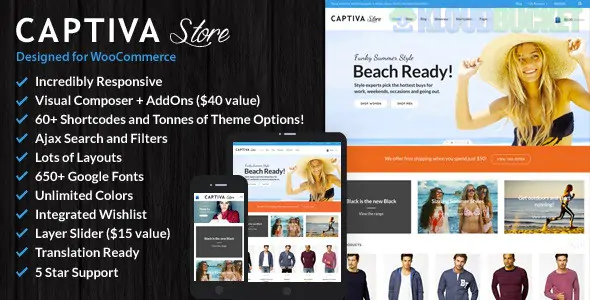
Captiva is a bright, modern, and high-conversion WooCommerce theme developed by CommerceGurus. It is specifically engineered for retailers who want a "fun and funky" vibe without sacrificing professional performance. While many themes target corporate or high-luxury niches, Captiva is built to be approachable, colorful, and extremely easy to set up for small-to-medium boutiques.
As of late 2025, it remains highly rated for its "human" customer support and its ability to turn a standard WordPress install into a stylish shop in minutes.
Predictive Ajax Search: A standout feature that shows product results instantly as the user types, significantly speeding up the customer's journey to the "Add to Cart" button.
WPBakery & Visual Composer Support: Includes a customized version of the visual builder with an "Add Ons Pack," giving you dozens of shop-specific shortcodes like "Featured Product Grids" and "On-Sale Sliders."
Advanced Product Layouts: You can choose between list or grid views for your shop pages and toggle sidebars (left, right, or none) depending on whether you want a focus on filters or a focus on imagery.
Mega Menu with Image Support: Allows you to create large, organized navigation menus that include product images or banners, perfect for shops with multiple diverse categories.
Catalog Mode: If you aren't ready to sell yet, you can toggle "Catalog Mode" to hide the cart and prices, turning your site into a digital lookbook.
Feature
Details
Developer
CommerceGurus (Power Elite Author)
Last Updated
October 2025 (v2.5+)
Page Builder
WPBakery / Visual Composer
Framework
Bootstrap 3.x Grid (Responsive & Mobile-first)
Key Plugins
LayerSlider, Revolution Slider, Ajax Search, Wishlist
Compatibility
WordPress 6.8+ / WooCommerce 10.x
To help you see where Captiva fits in your toolset:
Captiva vs. Vanesa: Vanesa is "High-End Luxury" (expensive, dark, moody). Captiva is "Retail Friendly" (vibrant, accessible, and fast).
Captiva vs. Electio: Electio is for high-spec tech gadgets with many technical tables. Captiva is better for lifestyle products, clothing, or handmade goods where the "vibe" matters as much as the specs.
Captiva vs. MinimalShop: MinimalShop is for ultra-lean stores. Captiva is for stores that want a bit more "pizzazz," animations, and layered sliders to catch the eye.
Captiva comes with several "Color Skins" ready to use. In 2025, branding consistency is vital for trust. If you use Captiva, don't just stick with the default; use the Theme Options Panel to match the theme’s highlight colors to your logo’s primary hex code. Because the theme uses a clean white background as its base, these small color pops (on buttons, icons, and links) create a professional, custom-coded look with zero effort.
Pro Tip: Captiva is known for its "Size Guide" feature on product pages. In the apparel industry, providing a clear size guide can reduce your return rate by up to 25%. Make sure to enable this on every clothing item to save yourself a customer service headache later.
Would you like me to help you configure the "Predictive Search" settings to prioritize your best-selling categories, or should we look at how to set up the "Mega Menu" with promotional images?
Setting up Captiva Theme Options
This tutorial provides a walkthrough of setting up a WooCommerce theme effectively, similar to the flexible options panel found in Captiva.
Subscribe to access unlimited downloads of themes, videos, graphics, plugins, and more premium assets for your creative needs.
.jpg) Help Us to Buy More New Theme/Plugin
Help Us to Buy More New Theme/Plugin
Published:
Dec 24, 2025 13:50 PM
Version:
v2.5
Category:
Developer:
ThemeforestLicense:
GPL v2 or Later