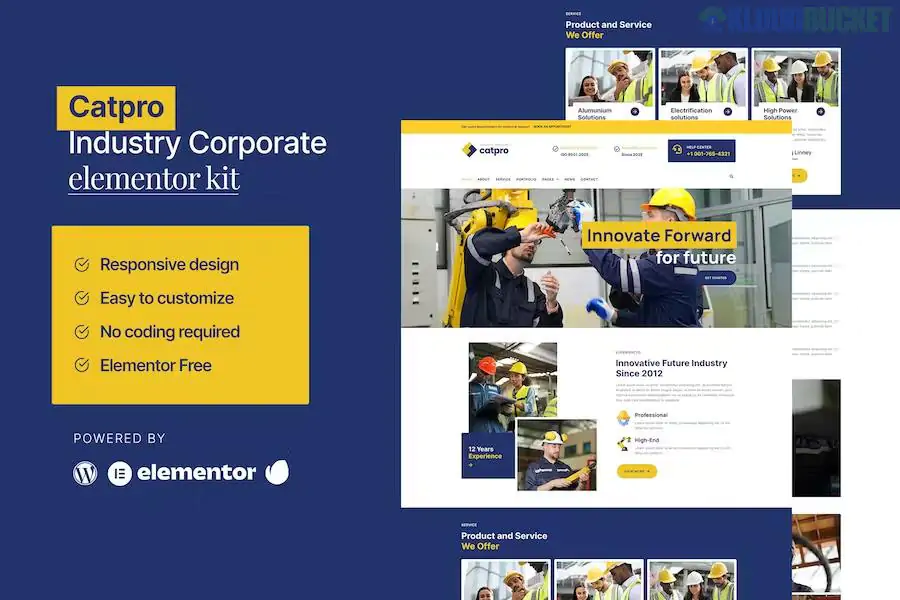
Catpro is a professional Elementor Template Kit tailored for industrial, corporate, and manufacturing businesses. It is designed to help construction firms, factories, and engineering agencies establish a credible online presence without needing custom code.
Unlike a full WordPress theme, Catpro is a collection of pre-designed layouts that you import into Elementor. It is specifically optimized to work with the Free version of Elementor, making it a budget-friendly option for small to mid-sized industrial companies.
The kit typically includes 8–12 essential page templates to cover a complete corporate website:
Homepage: A high-impact hero section with clear service call-outs.
About Us: Dedicated space for company history, mission, and vision.
Services: Overview page and individual service detail pages.
Portfolio: A gallery to showcase completed industrial projects or case studies.
News/Blog: Archive and single post layouts for industry updates.
Contact Us: Includes a functional contact form and Google Maps integration.
FAQ & Team: Sections for common client questions and leadership profiles.
Global Parts: Custom Header and Footer templates.
To use Catpro as shown in the demos, you will need the following installed on your WordPress site:
Elementor (Free): The core page builder.
Hello Elementor Theme: The recommended lightweight "blank slate" theme.
Premium Addons for Elementor: Often required for specific industrial-style widgets (like carousels or advanced headings).
MetForm: Used for the contact and inquiry forms.
Envato Elements Plugin: Necessary to import the kit .zip file into your site.
Install the Importer: Go to Plugins > Add New and install the "Template Kit – Import" (by Envato) plugin.
Upload the Kit: Go to Tools > Template Kit, click the "Upload" button, and select your Catpro .zip file.
Install Requirements: A banner will appear at the top saying "Install Requirements." Click it to automatically install the necessary free plugins.
Import Global Styles: Import the Global Kit Styles first. This sets your site-wide colors and fonts.
Import Pages: Import each page template one by one. Once imported, they will appear under Templates > Saved Templates.
Create Pages: Go to Pages > Add New, click Edit with Elementor, and use the gray folder icon to insert your saved Catpro templates.
Industry-Specific Design: Uses "heavy-duty" aesthetics—bold fonts, mechanical imagery, and corporate color palettes (often blues, grays, and oranges).
Elementor Free Compatible: You don't need a $59/year Elementor Pro subscription to get a professional look.
Fast Loading: Because it avoids heavy, "bloated" themes, it is easier to optimize for high Google PageSpeed scores.
Would you like me to help you find the CSS code to change the primary brand color across the entire Catpro kit, or do you need help setting up the MetForm for your contact page?
Subscribe to access unlimited downloads of themes, videos, graphics, plugins, and more premium assets for your creative needs.
.jpg) Help Us to Buy More New Theme/Plugin
Help Us to Buy More New Theme/Plugin
Published:
Dec 27, 2025 16:13 PM
Category:
Author:
OtherLicense:
GPL v2 or Later