Creative Timeline is a professional WordPress plugin developed by techeshta (available on CodeCanyon) designed to transform standard posts or custom content into visually engaging, chronological storylines. It is highly effective for businesses and individuals who want to "beautify" their history, roadmaps, or biographies without writing code.
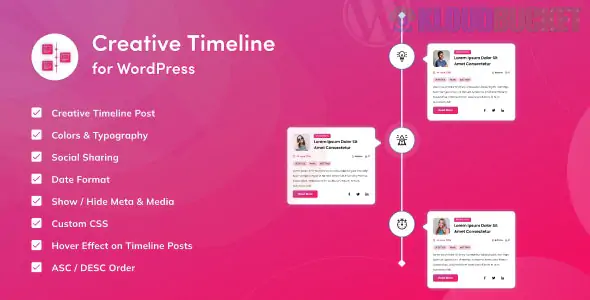
Vertical & Horizontal Modes: Display your events in a classic vertical list or a modern, side-scrolling horizontal slider.
35+ Smart Options: Deep control over every element, including dates, images, titles, descriptions, buttons, and social share icons.
Two Primary Styles:
Classic Timeline: A clean, professional look ideal for corporate history or project milestones.
Artistic Timeline: A more creative, stylized layout designed for personal biographies and portfolios.
Hover & Animation Effects: Includes pre-defined hover effects and box-shadow options to make the timeline interactive and attractive.
Custom Post Support: Automatically pulls data from your existing WordPress posts or custom post types.
Shortcode Builder: Generates a simple shortcode that allows you to drop the timeline into any page, sidebar, or post.
The plugin is versatile enough to handle various types of sequential content:
Use Case
How it Helps
Company History
Show the evolution of your brand from founding to the present day.
Project Roadmaps
Display upcoming software features or construction phases for stakeholders.
Author Biography
Create a visual "life story" or career path for team member pages.
Event Schedules
Layout a multi-day conference or festival itinerary in a readable format.
Process Steps
Explain a "How it Works" or "Step-by-Step" guide visually.
WordPress Version: Compatible with WordPress 4.9 through the latest 6.7.x versions.
Page Builder Friendly: Works seamlessly with Elementor, WPBakery, and the Gutenberg block editor via its shortcode builder.
Responsive: 100% mobile-friendly; the layouts automatically stack or adjust for smaller screens.
SEO Optimized: Uses clean, lightweight code to ensure timelines are crawlable by search engines and don't slow down your site.
Installation: Upload the plugin zip file through Plugins > Add New > Upload Plugin.
Create Content: Use the dedicated "Creative Timeline" menu in your dashboard to add your events (titles, descriptions, images, and dates).
Choose Style: Navigate to the Timeline Settings to select between the Horizontal/Vertical modes and Classic/Artistic styles.
Customize: Adjust the colors, borders, and typography to match your website's branding.
Publish: Copy the generated shortcode (e.g., [creative-timeline id="1"]) and paste it into your desired page.
While many "all-in-one" widget packs include a basic timeline, Creative Timeline is a dedicated tool. This means you get more specialized features, such as Social Share icons for individual events and Button Hover effects, which help keep visitors engaged with your story longer.
Would you like me to help you generate a shortcode for a Horizontal Roadmap, or do you need assistance customizing the "Artistic" style colors?
Subscribe to access unlimited downloads of themes, videos, graphics, plugins, and more premium assets for your creative needs.
.jpg) Help Us to Buy More New Theme/Plugin
Help Us to Buy More New Theme/Plugin
Published:
Dec 25, 2025 17:11 PM
Version:
v1.0.2
Category:
Author:
OtherLicense:
GPL v2 or LaterTags: