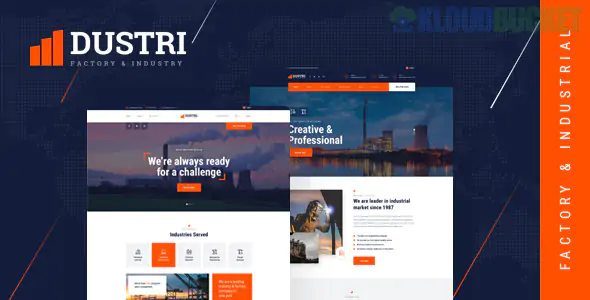
Dustri is a robust, professional Elementor Template Kit designed specifically for heavy industry, manufacturing, and factory businesses. It trades the "startup" polish of Startio for a more industrial, reliable, and high-contrast look that fits sectors like engineering or construction.
Here is the technical breakdown for getting Dustri up and running.
Dustri is quite comprehensive, typically including about 13 to 15 templates. You'll find:
2 Homepage Versions: One often focused on broad industrial services and another more specialized for a factory floor or specific product line.
Service & Project Pages: Dedicated layouts to showcase your machinery, production capabilities, and past industrial projects.
About & Team: Sections for company history, factory certifications, and leadership profiles.
Inquiry/Contact Forms: Built-in areas for clients to request manufacturing quotes or site inspections.
One of the best things about Dustri is that it is often designed to work without Elementor Pro, but check your specific version. It usually relies on these free "power-up" plugins:
Elementor: The base builder.
ElementsKit Lite: Used for the advanced headers, footers, and mega menus.
MetForm: Handles the industrial "Request a Quote" forms.
Jeg Elementor Kit (or similar): Often used for specific industrial-style widgets like "Process Timelines" or "Icon Boxes."
To ensure the site loads fast (crucial for SEO in competitive industrial niches), follow this import sequence:
Server Limits: Industrial kits can be heavy on images. Ensure your memory_limit is at least 512M and max_execution_time is 300.
Hello Elementor Theme: Again, use this lightweight theme to keep the focus on the kit's design.
Global Kit Styles: After uploading via the Envato Elements plugin, Import Global Styles first. This ensures your heavy-duty fonts (like Roboto or Montserrat) and brand colors (usually industrial oranges, blues, or grays) apply to every page.
Flexbox Containers: Modern versions of Dustri use Elementor’s Flexbox Containers. Make sure this is "Active" in Elementor > Settings > Features.
Certification Logos: Use the "Brand/Partner" carousel to display ISO certifications, safety awards, or industry memberships. This is a huge trust-builder in this niche.
Project Galleries: Use the "Portfolio" pages to show high-res photos of your facility. Authentic photos of your actual machines or warehouse will perform 10x better than generic stock photos of "men in hard hats."
CTA Placement: Ensure your "Get a Quote" or "Download Brochure" buttons are high-contrast (e.g., safety orange or bright yellow) so they stand out against the industrial gray backgrounds.
Would you like me to help you draft the technical "Our Process" section for your factory, or are you seeing an "Invalid Zip" error when trying to upload the kit?
Subscribe to access unlimited downloads of themes, videos, graphics, plugins, and more premium assets for your creative needs.
.jpg) Help Us to Buy More New Theme/Plugin
Help Us to Buy More New Theme/Plugin
Published:
Feb 02, 2026 09:46 AM
Category:
Author:
FunnelkitLicense:
GPL v2 or LaterTags: