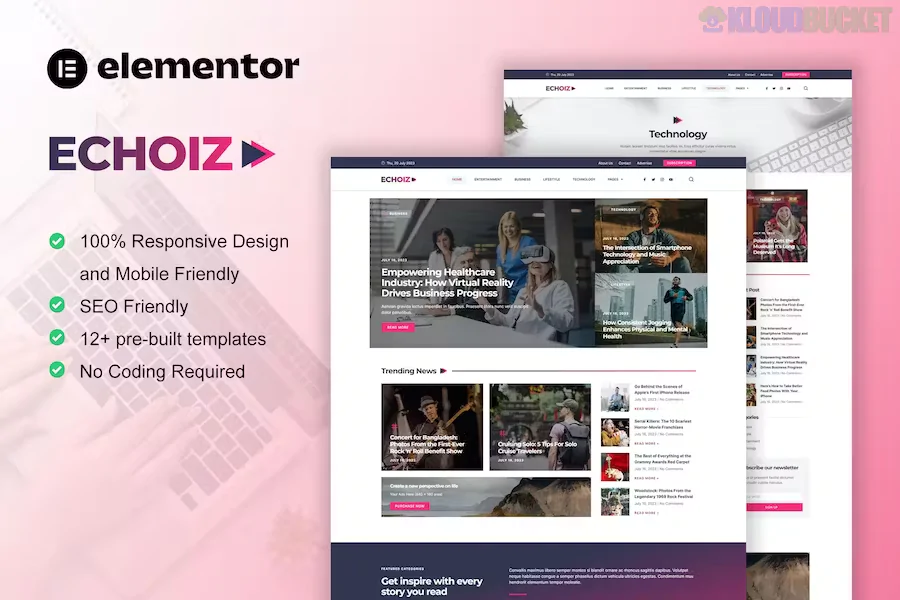
Echoiz is a professional Elementor Pro Template Kit specifically designed for modern news, digital magazines, and high-traffic blogs.1 Created by moxcreative, it is characterized by a "grid-heavy" layout that allows publishers to display a large volume of content without overwhelming the reader.
As of early 2026, Echoiz is a top choice for media startups because it utilizes the latest Elementor Flexbox Containers, making the site significantly faster and more responsive than older row-and-column-based templates.
Elementor Pro Powered: Unlike basic kits, Echoiz requires Elementor Pro.2 This allows for "Dynamic Content" features, such as custom headers, footers, and single-post templates that automatically pull in your latest articles.
40+ Unique Templates: The kit is massive, providing over 43 individual templates, including:3
Multiple Homepage Concepts: Ranging from tech-focused layouts to general news grids.4
Single Post Layouts: Different styles for long-form editorials or quick news snippets.
Category & Archive Pages: Designed to keep readers browsing with "Load More" or "Infinite Scroll" capabilities.
Author & Team Pages: Professional layouts to showcase your journalists and editorial staff.5
Global Style Kit: Includes a one-click "Global Kit Styles" import that sets your site-wide typography and color palette instantly.6
To use Echoiz, your WordPress environment must meet specific criteria to ensure the drag-and-drop features work smoothly.
Requirement
Details
Page Builder
Elementor Pro (Required for Theme Builder features)
Base Theme
Hello Elementor (Recommended for best performance)
Add-ons
ElementsKit Lite and Skyboot Custom Icons (Usually auto-installed)
PHP Version
8.1 or higher recommended
Elementor Feature
Flexbox Container must be set to "Active"
Pros:
No Coding Required: Every element is visual. You can change the "vibe" of your magazine by simply dragging blocks around.
SEO & Speed: Optimized for Google Core Web Vitals, ensuring your news site ranks well and loads quickly on mobile devices.7
Ad-Ready Spaces: The layouts include strategic "white space" and blocks that are perfect for placing Google AdSense or affiliate banners.
Cons:
Pro Requirement: You cannot use the core features (like the Header/Footer builder) without a paid Elementor Pro subscription.
Image Licensing: The demo images are for preview only; you will need to replace them with your own licensed photography.8
Install Plugins: Install the Envato Elements plugin from the WordPress repository.
Upload Kit: Go to Elements > Installed Kits and upload the echoiz.zip file you downloaded.9
Install Requirements: Click the orange "Install Requirements" button to load the necessary add-ons.10
Import Styles: Always import Global Kit Styles first.11
Create Pages: Create a new page, set the layout to "Elementor Full Width," and insert the Echoiz homepage template of your choice.
Publisher Tip: In 2026, engagement is key. Use the "Loop Grid" feature included in Echoiz to create unique "Featured Story" sections that update automatically whenever you publish a new post with a specific tag.12
Would you like me to help you compare Echoiz with other magazine kits like NeoNews or Nomadiq, or do you need the specific CSS classes to customize the post-hover effects?
Install Elementor Template kit Import & Installation
This video guide provides a clear, step-by-step walkthrough on how to properly import and activate Elementor template kits within your WordPress dashboard.
Subscribe to access unlimited downloads of themes, videos, graphics, plugins, and more premium assets for your creative needs.
.jpg) Help Us to Buy More New Theme/Plugin
Help Us to Buy More New Theme/Plugin
Published:
Jan 05, 2026 18:36 PM
Category:
Author:
All In One PluginLicense:
GPL v2 or Later