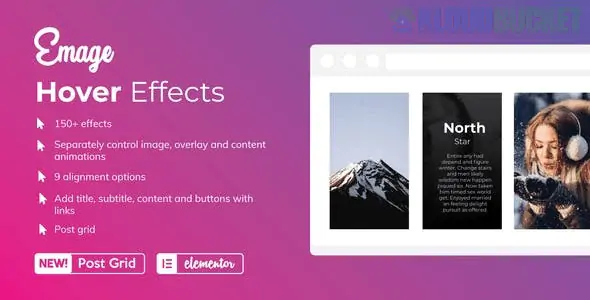
Emage is a high-performance Elementor add-on developed by Blocksera that focuses exclusively on advanced image hover interactions. Unlike general widget packs that include a single "Image Hover" widget, Emage is a specialized tool that allows you to apply separate, independent effects to the image, the overlay, and the content (text/buttons) simultaneously.
As of late 2025, it remains the most comprehensive "Image-to-Interaction" tool for Elementor, boasting over 150+ distinct hover effects that can be mixed and matched to create thousands of unique combinations.
Three-Layer Interaction: The only plugin that allows you to set a "Slide In" effect for your text, a "Zoom" effect for your background image, and a "Blur" effect for your overlay at the exact same time.
150+ Base Effects: A vast library ranging from simple fades and zooms to complex CSS3 transitions like 3D rotations, flipping, and masking.
Emage Post Grid: Includes a dedicated "Post Grid" widget that applies these high-end hover effects to your dynamic WordPress blog posts or custom post types (CPT).
9 Content Alignment Options: Precise control over where your captions, titles, and buttons appear (Top Left, Center, Bottom Right, etc.) upon hovering.
Linkable Elements: You can make the entire image a link or assign individual links to buttons within the hover content—perfect for portfolios or product showcases.
Fully Responsive: Meticulously optimized for touch devices; you can configure how effects behave on mobile where "hovering" is replaced by a "tap."
Feature
Details
Developer
Blocksera (via CodeCanyon)
Last Updated
December 5, 2025 (v2.x)
Compatibility
WordPress 6.7+ and Elementor / Elementor Pro
Gutenberg Optimized
No (Exclusive to Elementor)
Files Included
PHP, JavaScript JS, CSS
Performance
Optimized CSS-based animations for zero site lag
To get the most out of Emage's "Combination" system, follow this specific design logic:
Select the Image Layer: Choose an effect for the background image (e.g., Scale Up or Grayscale to Color).
Select the Overlay Layer: Add a color or gradient overlay and choose its entry animation (e.g., Slide from Left).
Select the Content Layer: Define how your title and description appear (e.g., Zoom Entrance).
Fine-tune Timing: Use the "Transition Duration" settings to ensure the text appears slightly after the overlay for a professional, layered look.
Interactive Portfolios: Displaying project names and "View Case Study" buttons only when a user engages with the image.
E-commerce Product Grids: Swapping to a secondary product shot or showing "Quick Buy" options on hover.
Team Galleries: Revealing social media icons and job titles behind a professional headshot.
Magazine Post Grids: Using the Emage Post Grid to make standard blog thumbnails feel modern and high-end.
Pro Tip: For a 2026 design aesthetic, use the "Glassmorphism" overlay setting combined with a subtle "Image Blur" effect. This creates a high-end, frosted-glass look for your text captions that is currently trending in premium UI design.
Would you like me to help you configure a combination of three effects to create a specific "3D Flip" look for your portfolio?
Top 10 Elementor Image Hover Effects
This video showcases creative and cool card hover animations that can be easily replicated using the extensive library of effects found in the Emage plugin.
Subscribe to access unlimited downloads of themes, videos, graphics, plugins, and more premium assets for your creative needs.
.jpg) Help Us to Buy More New Theme/Plugin
Help Us to Buy More New Theme/Plugin
Published:
Dec 17, 2025 15:59 PM
Version:
v4.5.2
Category:
Author:
OtherLicense:
GPL v2 or LaterTags: