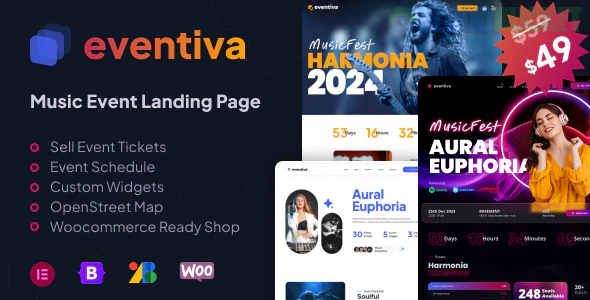
Eventiva is a high-energy, visually striking WordPress theme specifically designed for music festivals, concert tours, bands, and event promoters. Developed by Themeton, it focuses on a "digital poster" aesthetic—bold imagery, high-contrast colors, and a clear hierarchy for dates and ticket links.
Whether you are promoting a single tour or a multi-day music festival, Eventiva is built to turn casual listeners into ticket-buying attendees.
Music-Focused Landing Pages: Layouts designed to highlight lineup posters, headliners, and high-energy performance photography.
Event Schedule & Timelines: Built-in widgets to display "Set Times" or "Stage Lineups," allowing fans to plan their festival experience.
Integrated Audio Players: Includes sleek, minimalist music players so fans can listen to the artists while browsing the event details.
One-Click Demo Import: Specialized demos for "Single Band," "Electronic Festival," and "Jazz Concert" to get your site live quickly.
Booking & Ticket Integration: Strategic "Call to Action" buttons designed to link directly to Ticketmaster, Eventbrite, or WooCommerce for direct sales.
To ensure Eventiva handles heavy traffic during ticket drops, your setup should meet these standards:
PHP Version: 7.4 or higher (8.1+ recommended for faster load times).
Memory Limit: 256MB minimum (512MB recommended for sites with multiple audio/video embeds).
Required Plugins: Eventiva Core (bundled), Elementor, and Slider Revolution.
SSL Certificate: Absolutely essential if you are selling tickets or collecting user data on-site.
Category
Page Type
The Main Stage
Hero Landing Pages, Video Background Headers, Lineup Posters
Artist Focus
Artist Profiles, Band Bio, Discography/Music Player
Event Info
Set Times/Schedule, Venue Map, FAQ (Bag Policy, Parking, etc.)
E-Commerce
Official Merch Store, Ticket Pricing Tables, Cart/Checkout
The "Lineup" Grid: Use the specialized grid layouts to display your performers. You can categorize them by "Headliners," "Main Stage," and "Supporting Acts" to give the event a professional hierarchy.
Video Backgrounds: Music is a visual and auditory experience. Use the Revolution Slider to include high-quality clips of past festivals or music videos in the hero section to build excitement.
Ticket Tiers: Use the Pricing Table widget to clearly differentiate between "Early Bird," "General Admission," and "VIP" tickets. Adding a "Limited Availability" badge can help drive faster conversions.
Audio Integration: Don't just show the artists; let fans hear them. Use the custom audio player widgets to create a "Festival Playlist" right on the homepage.
Pro Tip: For music events, Mobile Optimization is critical. Most fans will see your ads on social media and click through via their phones. Test your "Ticket" button to ensure it is large, easy to tap, and leads to a fast-loading checkout page.
Would you like me to show you how to set up the "Festival Lineup" grid, or do you need help integrating an audio playlist for your band's profile?
Subscribe to access unlimited downloads of themes, videos, graphics, plugins, and more premium assets for your creative needs.
.jpg) Help Us to Buy More New Theme/Plugin
Help Us to Buy More New Theme/Plugin
Published:
Feb 01, 2026 12:34 PM
Version:
v1.1.2
Category:
Developer:
ThemeforestLicense:
GPL v2 or LaterTags: