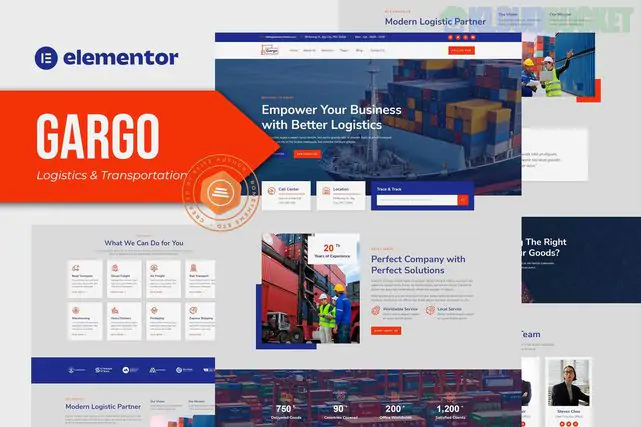
The Gargo - Logistics & Transportation Elementor Template Kit is a modern, professional set of pre-designed layouts specifically built for logistics companies, shipping firms, cargo services, and moving agencies.
Unlike a traditional WordPress "theme," this is a Template Kit, meaning it provides the page content and design data for the Elementor Page Builder, allowing for high customization without writing code.
15+ Pre-built Templates: Includes a comprehensive set of pages to launch a full site quickly.
No Coding Required: Built for the Elementor drag-and-drop visual builder.
Fully Responsive: Optimized for mobile, tablet, and desktop views.
Optimized for "Hello Elementor": While it works with most themes, it is best paired with the lightweight Hello Elementor theme for maximum speed.
Global Styles: Easily change colors and typography sitewide from one central setting.
Homepage: Multiple high-conversion landing page layouts.
About Us: Company history and mission sections.
Services: Detailed layouts for Freight, Warehousing, and Air/Sea transport.
Portfolio/Projects: To showcase your logistics network or past successful deliveries.
Contact Us: Integrated with MetForm for inquiry handling.
Header & Footer: Custom global headers and footers.
To make Gargo look exactly like the demo, you will need to install these (mostly free) plugins:
Elementor (Free version is usually sufficient, though Pro adds Theme Builder power).
ElementsKit Lite (For advanced widgets like headers and footers).
MetForm (For contact and quote request forms).
RomethemeKit (Specifically required for this kit's unique elements).
Install Plugins: Go to Plugins > Add New and install Envato Elements and the "Required Plugins" listed above.
Upload the Kit:
Go to Elements > Installed Kits.
Click Upload Template Kit ZIP File and select your Gargo file.
Install Requirements: A yellow bar will likely appear at the top. Click Install Requirements to ensure all necessary features are active.
Import Styles: Click Import on the Global Kit Styles first. This sets your site's colors and fonts.
Import Pages: Import your desired templates (Home, About, etc.) one by one.
Create Your Pages: Go to Pages > Add New, click Edit with Elementor, and use the gray folder icon to insert your newly imported Gargo templates.
Note: Template kits do not include the demo images in the final import due to licensing. You will see placeholders where images should be; you should replace these with your own high-quality logistics photography.
Would you like me to help you find high-quality, royalty-free logistics images to use for your new site?
Subscribe to access unlimited downloads of themes, videos, graphics, plugins, and more premium assets for your creative needs.
.jpg) Help Us to Buy More New Theme/Plugin
Help Us to Buy More New Theme/Plugin
Published:
Jan 21, 2026 12:09 PM
Category:
Author:
OtherLicense:
GPL v2 or Later