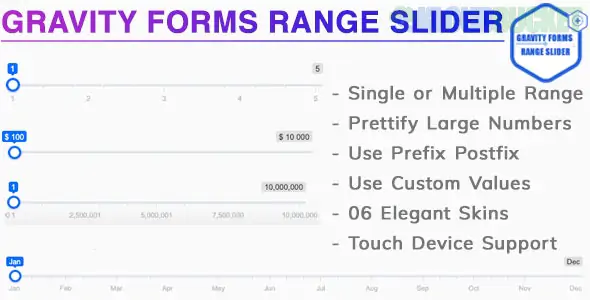
A Gravity Forms Range Slider Add-On is a specialized extension that replaces standard numeric input fields with an interactive slider. This allows users to select a value or a range (min/max) by dragging a handle along a track, which is significantly more user-friendly for mobile devices and visual-heavy forms.
Because Gravity Forms does not include a native slider field, several developers offer different versions of this add-on.
Depending on your needs (free vs. pro), there are three main ways to get this functionality:
Provider
Best For
Key Features
PluginsCafe (Pro)
High-end projects
Text sliders, dual-handles, and "Pips" (points along the slider).
GravityWP (Advanced Number Field)
Calculations
Real-time calculations and rulers/ticks under the slider.
Yee Add-ons (Pro)
Style/Skins
6 beautiful UI skins and full touch support for mobile.
Regardless of which version you choose, most range slider add-ons provide:
Single or Dual Handles: Use one handle for a single value (e.g., "Age") or two handles for a range (e.g., "Budget between $500–$1000").
Custom Step Increments: Control how the slider "jumps." For example, you can set a step of 5 so users can only pick 5, 10, 15, etc.
Prefixes & Postfixes: Add currency symbols ($) or units (%, kg, ft²) that appear next to the value.
Merge Tag Support: Use the selected slider value in other fields or calculations (e.g., a "Price Calculator").
Conditional Logic: Show or hide other form fields based on where the user moves the slider handle.
Most of these plugins follow a similar setup process:
Install & Activate: Upload the add-on .zip file to your WordPress Plugins section.
Add the Field: Open your Gravity Form editor. You will find a new field type called "Range Slider" under the "Advanced Fields" or "Standard Fields" tab.
Configure: * Set the Minimum (e.g., 0) and Maximum (e.g., 10,000).
Choose the Step (e.g., 100).
Toggle "Dual Handles" if you need a range.
Style: Choose a "Skin" or use custom CSS to match your website’s theme.
If you are building a quote calculator (like a mortgage or service estimator), use the GravityWP version. It features an "Update calculations while sliding" option. This ensures that as the user drags the slider, the "Total Price" updates instantly without the user having to let go of the handle or click "Submit."
Would you like me to help you find the specific CSS code to change the color of the slider handle to match your brand?
Subscribe to access unlimited downloads of themes, videos, graphics, plugins, and more premium assets for your creative needs.
.jpg) Help Us to Buy More New Theme/Plugin
Help Us to Buy More New Theme/Plugin
Published:
Jan 12, 2026 14:29 PM
Version:
v3.0.0
Category:
Author:
OtherLicense:
GPL v2 or LaterTags: