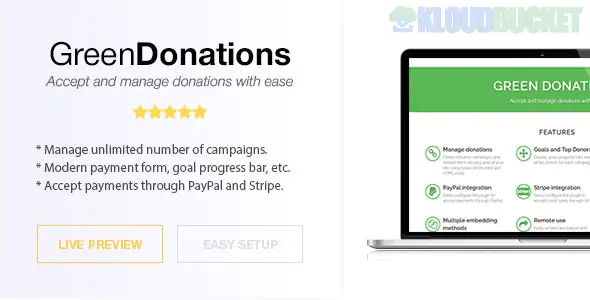
Green Donations for WordPress is a powerful, lightweight, and easy-to-use donation management plugin designed to help non-profits, NGOs, and individual creators accept funds directly on their websites.
Unlike many complex platforms that charge monthly fees or take a commission from your donations, Green Donations is typically a "buy once" solution that gives you full control over your fundraising campaigns.
Multiple Payment Gateways: Supports major providers including PayPal, Stripe, Authorize.net, and Mollie.
Campaign Management: Create unlimited donation campaigns with individual goals, progress bars, and descriptions.
No Commission Fees: The plugin does not take a percentage of your donations (though payment processors like Stripe or PayPal still charge their standard transaction fees).
Progress Bars: Visually showcase how close you are to your fundraising target to encourage more contributions.
Email Notifications: Automatically send "Thank You" emails to donors and notifications to administrators.
Exportable Data: Easily export your donor list and transaction history to CSV for accounting or CRM purposes.
The plugin is designed to be user-friendly for both the admin and the donor:
Feature
Description
Fixed or Custom Amounts
Allow donors to choose from pre-defined amounts ($10, $50, $100) or enter their own.
Tributes & Dedications
Option for donors to give "In Honor of" or "In Memory of" someone.
Recurring Donations
(Depending on the version) Supports monthly or yearly recurring gifts.
Shortcode System
Easily embed your donation forms into any page, post, or sidebar widget.
Optimized Checkout
A streamlined, mobile-responsive checkout process to reduce "cart abandonment" on donations.
WordPress: 5.0 or higher.
SSL Certificate (HTTPS): Mandatory for processing secure credit card payments.
PHP Version: $7.4$ or higher is recommended.
Database: Standard MySQL/MariaDB.
Install & Activate: Upload the plugin via Plugins > Add New > Upload Plugin.
Configure Gateways: Go to Green Donations > Settings and enter your API keys for Stripe or PayPal.
Create a Campaign: Go to Green Donations > Campaigns > Add New.
Set your Goal Amount.
Choose your Currency.
Add a compelling Description and Featured Image.
Add to Page: Copy the generated Shortcode (e.g., [green-donations id="123"]) and paste it into any Elementor block, Gutenberg block, or classic editor page.
Test: Always run a "Sandbox" or "Test Mode" transaction to ensure the money is routing correctly before going live.
The "Green" in the name often refers to its lightweight footprint. It doesn't bloat your database or slow down your site like some of the larger, all-in-one "charity suites." It is the perfect middle ground for organizations that have outgrown simple "PayPal buttons" but aren't ready for a massive enterprise-level CRM.
Would you like me to help you set up your first campaign, or do you need assistance connecting your Stripe or PayPal API keys?
Subscribe to access unlimited downloads of themes, videos, graphics, plugins, and more premium assets for your creative needs.
.jpg) Help Us to Buy More New Theme/Plugin
Help Us to Buy More New Theme/Plugin
Published:
Dec 25, 2025 16:49 PM
Version:
v3.0.7
Category:
Author:
OtherLicense:
GPL v2 or LaterTags: