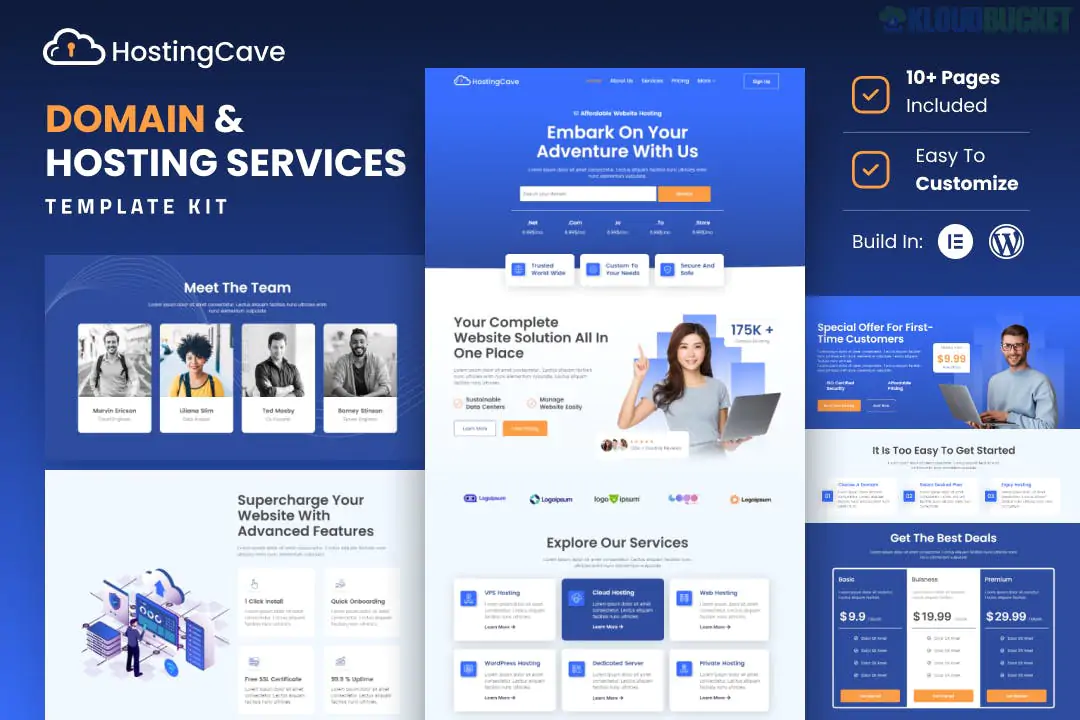
Hostingcave – Web Hosting Services Elementor Template Kit is a modern, tech-focused layout collection designed for web hosting providers, domain registrars, cloud services, and IT infrastructure companies. Developed by Jegtheme, it features a sleek "SaaS-style" aesthetic that is optimized for high conversion and technical clarity.
This kit is particularly popular because it is built to work with the free version of Elementor, meaning you don't need a Pro license to launch a professional hosting site.
Tech-Centric Design: Uses a modern blue-and-white color palette with clean gradients and vector illustrations typical of the hosting industry.
No Elementor Pro Required: All "Pro" features like headers, footers, and complex widgets are handled by free add-ons.
Highly Optimized: Designed for fast loading times and a "Retina Ready" display on high-resolution screens.
Scalable Layouts: Perfect for businesses offering multiple tiers of service (Shared, VPS, Dedicated, etc.).
Home Page: Features a domain search bar (visual), pricing table highlights, and server location maps.
About Us: A clean layout to showcase your data center reliability and company history.
Services/Pricing: Dedicated pages for different hosting types with detailed comparison tables.
Domain Search Page: A specialized layout focused on domain registration and TLD pricing.
Support/FAQ: Clean, organized sections to reduce customer support tickets.
Contact Us: Integrated with lead generation and support inquiry forms.
Blog: Main blog listing and single article templates for content marketing.
To replicate the Hostingcave demo exactly, you will need to install these free plugins:
Elementor (Free)
Jeg Elementor Kit: Manages the header, footer, and advanced hosting-specific widgets.
MetForm: For the contact forms and "Get a Quote" modules.
Envato Elements Plugin: Used to import and manage the kit.
Note on Functionality: This kit provides the design for a domain search bar and pricing tables. To make them "live" (e.g., actually searching for domains or billing customers), you will typically need to integrate a service like WHMCS or a WordPress hosting plugin like WP Domain Checker.
Preparation: Install the Hello Elementor theme for maximum speed.
Plugin Setup: Install the Envato Elements plugin from the WordPress repository.
Upload: Go to Elements > Installed Kits and upload your Hostingcave Zip file.
Requirements: Click Install Requirements to ensure all necessary free plugins are active.
Import Order:
First: Import the Global Kit Styles.
Second: Import individual pages (Home, Pricing, etc.).
Third: Use the Jeg Elementor Kit settings to assign the Header and Footer templates site-wide.
Would you like me to help you draft the technical specifications for your "Shared vs. VPS" pricing table, or do you need help integrating a live domain search tool into this template?
Subscribe to access unlimited downloads of themes, videos, graphics, plugins, and more premium assets for your creative needs.
.jpg) Help Us to Buy More New Theme/Plugin
Help Us to Buy More New Theme/Plugin
Published:
Dec 30, 2025 17:05 PM
Category:
Author:
OtherLicense:
GPL v2 or Later