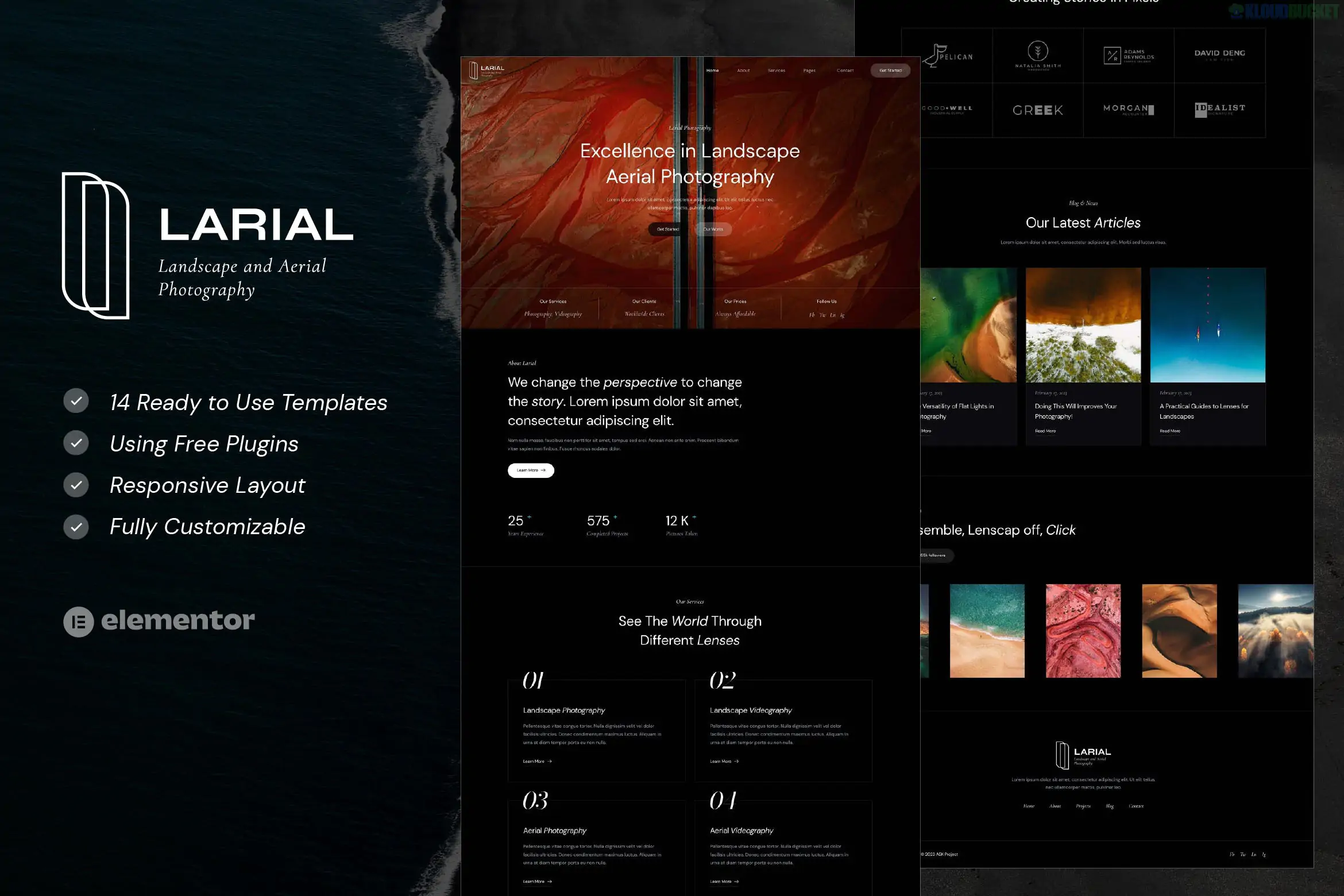
Larial – Landscape & Aerial Photography Elementor Template Kit is a modern, high-visual design package specifically built for photographers and videographers who focus on vast scenery and drone-based media.1
Created by askproject, it is optimized for high-resolution imagery and provides a sophisticated, clean aesthetic that allows the visuals to take center stage.
No Elementor Pro Required:2 One of its biggest advantages is that it functions fully with the FREE version of Elementor.3
Specialized for Aerial Media: Includes layouts tailored for drone pilots and videography studios, featuring large hero sections and video-friendly containers.
100% Responsive: Meticulously designed to ensure that large-scale landscape photos look just as impressive on a smartphone as they do on a 4K monitor.
14 Stunning Templates: A comprehensive collection covering 12 ready-to-use pages and additional site-wide components.4
Pages: 2 Homepage variations, About Us, Services, Service Detail, Pricing, and FAQ.
Portfolios: Gallery (to showcase stills) and Portfolio (for project-based work).
Blog: Blog Archive and Single Post layouts for travel stories and gear reviews.5
Functional: Contact Us, Header, Footer, and 404 Error page.6
To achieve the exact look of the demo, the kit will prompt you to install:
Elementor: The core builder.
ElementsKit Lite: Used for building the global header/footer and advanced navigation.
WPForms Lite: To handle contact and inquiry forms.
Gum Elementor Addon: Provides the specialized "Extra" widgets and creative layouts found in the kit.7
Install Base Theme: The developer recommends using the Hello Elementor theme for maximum speed.8
Import Tool: Use the "Envato Elements" or "Template Kit Import" plugin.9
Requirements: Click the orange "Install Requirements" banner to auto-activate the plugins listed above.10
Import Order:
Step 1: Click Import on the Global Kit Styles (this sets your fonts and colors).11
Step 2: Import individual pages.12 They will be stored in Templates > Saved Templates.13
Page Setup: When creating a new page, set the Page Layout to "Elementor Full Width" and hide the page title in the settings.14
Note: The stunning aerial and landscape photos in the demo are for preview only. You must replace them with your own work or license them from Envato Elements to use them legally on a live site.15
Would you like me to help you find a specific "Video Background" widget or CSS trick to make your drone footage play automatically in the Larial header?
Subscribe to access unlimited downloads of themes, videos, graphics, plugins, and more premium assets for your creative needs.
.jpg) Help Us to Buy More New Theme/Plugin
Help Us to Buy More New Theme/Plugin
Published:
Jan 19, 2026 17:33 PM
Category:
Author:
OtherLicense:
GPL v2 or Later