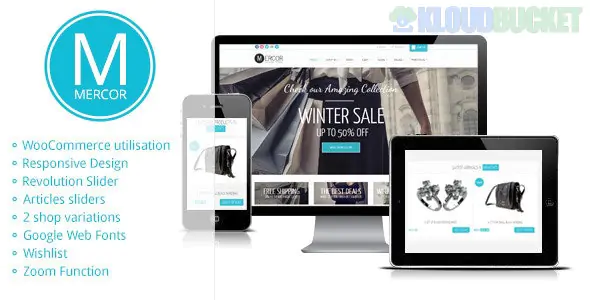
**Mercor** is a classic, robust, and clean WooCommerce WordPress theme designed for retail businesses that prioritize a straightforward, user-friendly shopping experience. Developed by **Pexeto**, it is known for its balance between high-end aesthetics and high-conversion layouts, making it a reliable choice for everything from fashion boutiques to electronics stores.
While it is a legacy-favorite theme, it has been modernized to support the latest versions of **WooCommerce** and is built on a custom, highly flexible framework.
---
### ## Key Features
* **Intuitive Shop Layouts:** Features a clean, grid-based product display that focuses on clarity and easy navigation for the customer.
* **Pexeto Theme Options:** Powered by a custom, user-friendly admin panel that allows you to change colors, fonts, and layouts without touching any code.
* **Product Showcase Sliders:** Includes multiple slider types (including the popular Nivo and Content sliders) to highlight featured collections or seasonal sales.
* **Highly Responsive:** The theme’s "fluid" grid system ensures that the shopping experience is just as smooth on a smartphone as it is on a desktop.
* **Search Engine Optimized:** Built with clean code and a logical heading structure to help your products rank better in Google Shopping results.
---
### ### Technical Requirements
To ensure **Mercor** handles your product catalog efficiently, your hosting should meet these standards:
* **PHP Version:** 7.4 or higher.
* **Memory Limit:** **256MB** (minimum) to manage WooCommerce processes and image processing.
* **Required Plugins:** **WooCommerce**, **Pexeto Core** (bundled), and it often integrates well with **Contact Form 7**.
* **Browser Support:** Fully compatible with all modern browsers (Chrome, Safari, Firefox, Edge).
---
### ### Included Layout Options
| Category | Style / Options |
| --- | --- |
| **Product Display** | Grid View, List View, Product Quick View, Sale Badges |
| **Shop Sidebar** | Left, Right, or Full-width (no sidebar) options for product filtering |
| **Portfolio/Blog** | Multiple masonry and grid layouts for brand storytelling |
| **Custom Widgets** | Specialized widgets for "Recent Products," "Top Rated," and "Social Media" |
---
### ### Setup & Retail Strategy Tips
1. **Clear Product Imagery:** Mercor thrives on a minimalist white or light-grey background. Use high-resolution product photos with consistent backgrounds to make your store look like a professional high-street brand.
2. **Filter Sidebar:** Don't overload your sidebar. Use the **WooCommerce Layered Nav** widgets to allow customers to filter by "Price," "Size," or "Color" only. Too many filters can lead to "decision fatigue."
3. **Accent Colors:** Use the theme's color picker to choose a single, high-contrast **Accent Color** for your "Add to Cart" and "Checkout" buttons. This draws the eye exactly where you want it to go.
4. **Brand Storytelling:** Use the integrated **Portfolio** or **Blog** sections to create "Buying Guides." For example, if you sell furniture, write a post on "How to Choose the Right Sofa for Small Spaces" and link directly to your products.
> **Pro Tip:** Because Mercor is a "clean" theme, site speed is its secret weapon. Ensure you use a plugin like **WP Rocket** or **Autoptimize** to minify the CSS and JS, making the checkout process lightning-fast for your customers.
---
**Would you like me to help you configure the "Product Filter" sidebar, or do you need assistance setting up the "Featured Product Slider" for your homepage?**
Subscribe to access unlimited downloads of themes, videos, graphics, plugins, and more premium assets for your creative needs.
.jpg) Help Us to Buy More New Theme/Plugin
Help Us to Buy More New Theme/Plugin
Published:
Feb 01, 2026 12:28 PM
Version:
v4.0.3
Category:
Developer:
ThemeforestLicense:
GPL v2 or LaterTags: