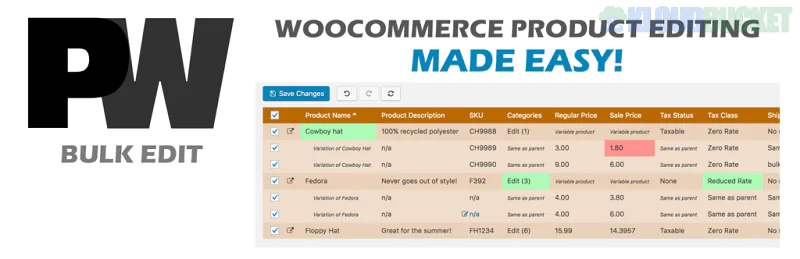
PW WooCommerce Bulk Edit Pro, developed by PimWick, is a high-speed catalog management tool designed for stores that have outgrown the native WooCommerce bulk edit functionality. It uses a "spreadsheet-style" interface that allows for both inline editing and massive batch updates without the need for exporting to CSV.
As of late 2025, it remains a top-rated choice for its safety-first approach, specifically its live-preview system that shows exactly how your data will change before you commit it to the database.
Advanced Field Editing: Access to fields restricted in the free version, including Categories, Sale Price Dates, Images, and Shipping Classes.
Live Preview & Undo: A "Safety Net" that highlights changed values (price drops are highlighted in red). You can undo or redo changes before hitting the final "Save" button.
Variation Management: Edit attributes and variations (size, color, price) as quickly as simple products. You can even automatically create new variations for existing products.
Smart Search & Regex: Use powerful Regular Expressions (Regex) to find and replace text strings within product descriptions or titles across thousands of items.
Image Management: Bulk set, clear, or update featured images and product gallery photos.
Dynamic Pricing Rules: Increase or decrease prices by a fixed amount or percentage, and round the results to the nearest .99 or whole number.
Saved Filters: Save your complex search queries (e.g., "All out-of-stock items in the 'Electronics' category") to re-run them instantly in the future.
Feature
Details
Developer
PimWick, LLC
Current Version
3.21+
Compatibility
WordPress 6.8+ and WooCommerce 9.4+ (HPOS Ready)
Row Limit
Optimized for 1,000+ rows per view (Performance limited)
Integrations
Dokan, MultiVendorX, WooCommerce Brands, YITH Multi Vendor
Pricing
~$59/year for 1 Site; ~$89/year for 5 Sites
To use the plugin effectively, follow the "Filter-Edit-Save" logic:
Filter: Use the sidebar to narrow down your list (e.g., filter by Category or Stock Status).
Edit: * Inline: Click any cell to type a new value directly.
Bulk: Click a column header (like "Regular Price") to apply a mathematical change to all filtered items at once.
Preview: Review the highlighted changes in the grid.
Save: Click the green "Save Changes" button to apply the updates to your database.
Flash Sales: Quickly setting sale prices for an entire category and scheduling the start/end dates.
Inventory Correction: Rapidly updating stock quantities for hundreds of products after a physical audit.
SEO Cleanups: Appending specific keywords to the beginning or end of all product titles in a specific brand.
Migration Cleanup: Using the Regex tool to fix broken links or specific formatting errors after importing products from another platform.
Pro Tip: If your server is hitting a "Memory Exhausted" error while editing thousands of items, use the PWBE_MEMORY_LIMIT constant in your wp-config.php file to specifically increase the memory allocated to the bulk editor without affecting the rest of your site's performance.
Would you like me to help you create a Regular Expression (Regex) for a complex search-and-replace task in your product descriptions?
Subscribe to access unlimited downloads of themes, videos, graphics, plugins, and more premium assets for your creative needs.
.jpg) Help Us to Buy More New Theme/Plugin
Help Us to Buy More New Theme/Plugin
Published:
Dec 17, 2025 16:33 PM
Version:
v2.366
Category:
Author:
OtherLicense:
GPL v2 or LaterTags: