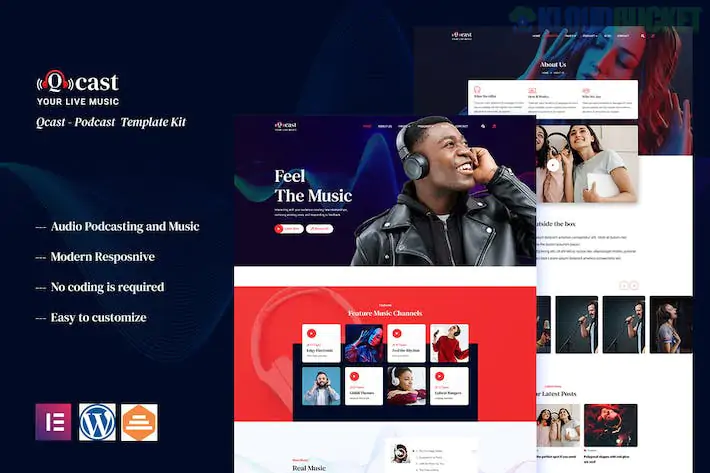
**Qcast** is a modern, high-energy Elementor Template Kit specifically designed for podcasters, musicians, radio stations, and audio content creators. It features a "dark mode" aesthetic by default, which helps vibrant cover art and play buttons pop, creating a high-end digital streaming experience.
Unlike standard blog kits, Qcast is built to handle audio embeds and "show note" layouts efficiently.
---
## 🎙️ What’s Inside the Qcast Kit?
Qcast provides a comprehensive set of **15+ templates** that focus on audio distribution and listener engagement:
* **3 Homepage Variations:** Optimized for solo podcasters, music bands, or multi-host networks.
* **Episode/Podcast Archives:** Clean grid layouts that display episode numbers, durations, and "Play Now" buttons.
* **Single Episode Pages:** Optimized for "Show Notes," guest bios, and embedded audio players (Spotify, SoundCloud, etc.).
* **Artist/Host Profiles:** Dedicated pages to introduce the voices behind the mic.
* **Event & Tour Layouts:** If you are a musician or doing a live podcast tour, there are pre-built "Upcoming Show" lists.
* **Platform Links:** Custom sections to link directly to Apple Podcasts, Spotify, and YouTube.
---
## 🛠️ Technical Requirements
Qcast is highly accessible because it is **"Free Version Friendly"**, meaning you don't need Elementor Pro to achieve the professional look. It relies on several free power-ups:
* **Elementor (Free Version):** The core page builder.
* **Jeg Elementor Kit:** This is the "brain" of the kit, providing the specialized audio lists and post grids.
* **MetForm:** Handles your listener feedback and "Guest Application" forms.
* **Hello Elementor Theme:** The recommended lightweight base.
---
## 🚀 The Qcast Setup Roadmap
To ensure the audio players and gradients load correctly, follow this sequence:
1. **Preparation:** Install **Hello Elementor** and the **Envato Elements** plugin.
2. **Upload:** Go to `Elements > Installed Kits` and upload your `qcast-kit.zip`.
3. **The Orange Banner:** Click **"Install Requirements"** to automatically pull in Jeg Elementor Kit and MetForm.
4. **Global Styles First:** **Import the Global Kit Styles first.** This is crucial for Qcast—it sets the neon accents and dark backgrounds that define the kit's look.
5. **Importing Forms:** Don't forget to import the **MetForm blocks** separately if they don't appear in your contact page automatically.
---
## 💡 Pro Tips for Podcasters & Musicians
* **Dynamic Audio Players:** Qcast works perfectly with the **Presto Player** or the native Elementor Audio widget. For a more "branded" look, use a plugin that allows you to change the player color to match Qcast's neon accents.
* **Sticky Player Strategy:** Consider adding a "Global Audio Player" to your footer so your listeners can browse your site without the music or podcast stopping.
* **SEO for Audio:** Use the **Single Episode** template to include a full transcript. This is the #1 way to get your podcast ranked on Google.
* **Show Guest Socials:** Use the "Team" widget on episode pages to link to your guest’s social media, encouraging them to share the page with their own audience.
---
**Would you like me to help you set up the "Show Notes" layout for your first episode, or are you having trouble getting your Spotify embed to align correctly?**
Subscribe to access unlimited downloads of themes, videos, graphics, plugins, and more premium assets for your creative needs.
.jpg) Help Us to Buy More New Theme/Plugin
Help Us to Buy More New Theme/Plugin
Published:
Feb 02, 2026 10:21 AM
Category:
Author:
OtherLicense:
GPL v2 or LaterTags: