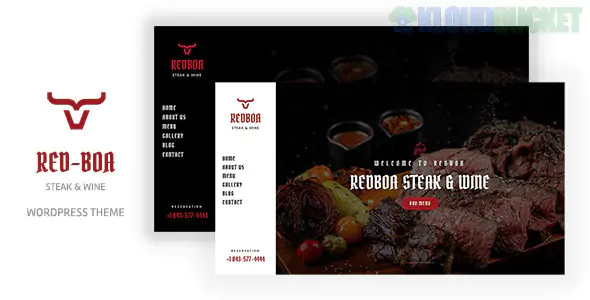
**Redboa** is a premium WordPress theme designed with a bold, masculine aesthetic tailored for steakhouses, BBQ grills, wineries, and upscale meat-focused restaurants. Built on the **Elementor Page Builder**, it balances high-quality food photography with a functional layout that prioritizes reservations and menu browsing.
It is a "ready-to-go" solution for restaurateurs who want a modern, high-end digital presence without the complexity of building from scratch.
---
## 🥩 Key Features for Restaurants
Redboa includes specific modules designed to handle the daily operations of a steakhouse:
* **Menu Management:** Elegant layouts to showcase different cuts of meat, wine pairings, and appetizers with clear pricing.
* **Reservation Integration:** Works seamlessly with standard WordPress reservation plugins (and often includes a custom booking form) to let guests secure a table directly.
* **One-Click Demo Import:** Allows you to import the entire "Steakhouse" look—complete with images and layouts—in minutes.
* **Dark & Rich Aesthetic:** Uses a "Dark Mode" foundation that evokes the ambiance of a classic, high-end steakhouse.
* **Fully Responsive:** Optimized for diners who are checking your menu or location on their mobile devices while on the move.
---
## 🛠️ Technical Foundation
Redboa is built using modern WordPress standards to ensure it stays fast and secure:
* **Elementor Builder:** Every page is drag-and-drop. You can change your "Chef's Specials" or "Steak of the Month" without touching a line of code.
* **Redux Framework:** Uses the powerful Redux options panel, giving you deep control over global colors, 600+ Google Fonts, and header styles.
* **Bootstrap 4/5:** Built on the latest CSS framework for a "Mobile-First" grid system.
* **SEO Optimized:** The code is lightweight and structured to help your restaurant rank for local keywords like "best steakhouse near me."
---
## 🚀 The Redboa Setup Blueprint
To get your restaurant online quickly, follow this implementation path:
1. **Installation:** Upload the `redboa.zip` via your WordPress dashboard.
2. **Required Plugins:** Upon activation, Redboa will ask you to install **Elementor**, **Contact Form 7**, and the **Redux Framework**.
3. **The Demo Import:** Use the "One-Click Import" feature to bring in the steakhouse styling. **Tip:** This will replace your current homepage, so do this on a fresh installation.
4. **The Menu Setup:** Use the "Food Menu" section to input your dishes. Group them by categories like "Signature Cuts," "Sides," and "Cellar Selection."
5. **Location & Hours:** Don't forget to update the footer with your Google Maps location and operating hours, as these are the most-searched details for restaurants.
---
## 💡 Strategy for 2026
* **Visual "Sizzle":** Use Elementor’s video background feature for the hero section. A 5-second loop of a steak on a grill (the "sizzle") is the most effective way to trigger an immediate appetite in your visitors.
* **Instagram Feed:** Use a free plugin to pull your Instagram feed into the Redboa footer. Real-time photos of happy diners and fresh plates build more trust than professional stock photos alone.
* **Online Ordering:** If you offer takeaway, Redboa is **WooCommerce ready.** You can easily add a "Order for Pickup" feature to your menu items.
* **Gift Cards:** Use the shop functionality to sell digital gift cards. This is a massive revenue stream for steakhouses, especially during holiday seasons.
---
## ⚙️ Requirements
* **WordPress:** 6.0 or higher.
* **PHP:** 7.4 or 8.x (Recommended for faster page loads).
* **Memory Limit:** Ensure your hosting has at least **256M** to handle the Elementor editor smoothly.
**Would you like me to help you set up the "Book a Table" form logic, or are you having trouble getting your high-res steak photos to fit into the menu grids?**
Subscribe to access unlimited downloads of themes, videos, graphics, plugins, and more premium assets for your creative needs.
.jpg) Help Us to Buy More New Theme/Plugin
Help Us to Buy More New Theme/Plugin
Published:
Feb 02, 2026 11:19 AM
Category:
Developer:
ThemeforestLicense:
GPL v2 or Later