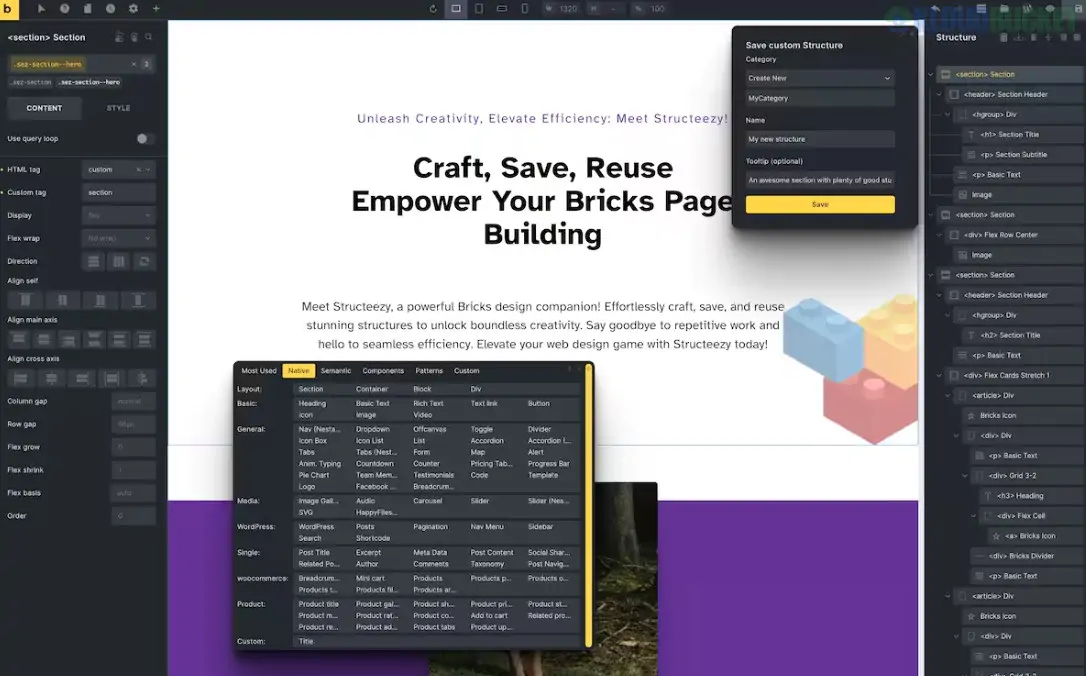
Structeezy is a powerful productivity extension for the Bricks Builder theme on WordPress. Created by the developer behind OxyProps, it is designed to streamline the "structure tree" workflow, allowing you to build, manage, and reuse layout components with significantly more speed and organization.
Think of it as a "Structure Manager" that sits inside your Bricks editor, helping you move away from repetitive building toward a more modular, component-based approach.
Structure Tree Builder: Provides a more intuitive way to manage your elements. You can craft complex layouts and save them as reusable "Structures" without leaving the canvas.
Save & Reuse (Custom Library): Easily save any element or container as a custom structure. These are stored in a dedicated panel, allowing you to drag and drop them into any new page or project.
CSS Framework Integration: Structeezy can automatically detect and sync with popular CSS frameworks like Automatic.css (ACSS), CoreFramework, and OxyProps. It suggests framework-specific variables for your margins, colors, and spacing as you build.
HTML-to-Bricks Conversion: One of its most advanced features is the ability to take raw HTML code from the web and transform it into editable Bricks elements, saving hours of manual reconstruction.
Sharing & Collaboration: You can export your saved structures as .json files to share with team members or use across different client websites.
Usage Tracking: It includes a "Most Used" group that tracks which structures you use most frequently, placing your favorite building blocks at your fingertips.
Feature
Details
Type
Bricks Builder Add-on (Plugin)
Requirements
Bricks Builder Theme (Active)
Latest Status
Active (Maintained for Bricks 1.11+ and PHP 8.x)
Framework Support
ACSS, CoreFramework, OxyProps, Vanilla CSS
Workflow
Right-click saving, Drag-and-drop reuse
Craft: Build your element (e.g., a custom hero section with pseudo-elements and specific mobile settings) once using the Bricks editor.
Save: Right-click the parent container in the Structure Panel, select Structeezy, and click the "Floppy Disk" icon to save it to your library.
Reuse: On a new page, open the Structeezy Panel (usually on the left), go to the Custom tab, and simply click your saved structure to inject it instantly.
Agencies: Building a "Core Design System" of buttons, cards, and headers that can be deployed across every client site for a consistent but customizable brand look.
Freelance Developers: Speeding up the development of repetitive sections like FAQs, Testimonial Sliders, or Feature Grids.
UI/UX Designers: Prototyping complex layouts in Bricks and saving the successful components for future use.
Pro Tip: If you use Automatic.css, enable the framework integration in the Structeezy preferences. This ensures that when you save a structure, it retains its responsive CSS variables ($space-m, $text-l) rather than fixed pixel values, making your reused components perfectly responsive across every site.
Would you like me to walk you through the Import/Export process so you can move your Structeezy library to a new WordPress installation?
Subscribe to access unlimited downloads of themes, videos, graphics, plugins, and more premium assets for your creative needs.
.jpg) Help Us to Buy More New Theme/Plugin
Help Us to Buy More New Theme/Plugin
Published:
Dec 17, 2025 16:03 PM
Version:
v1.2.3
Category:
Author:
OtherLicense:
GPL v2 or Later