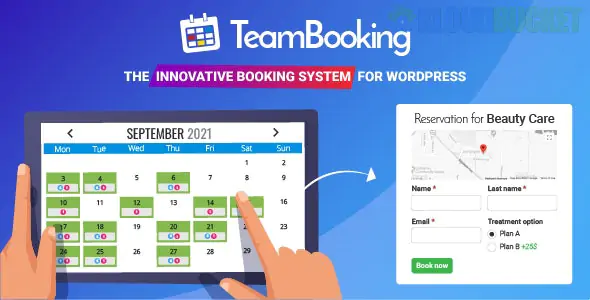
It sounds like you are looking into Team Booking, one of the most popular and powerful booking plugins for WordPress. It’s particularly well-known for its deep integration with Google Calendar.
Here is a breakdown of what makes it stand out, as well as some things to consider before you hit "purchase."
Unlike many booking plugins that store appointments only in your WordPress database, Team Booking treats Google Calendar as the master source of truth.
Availability is Managed via Google: You don't have to log in to WordPress to set your hours. You simply create "free" slots in your Google Calendar, and the plugin turns them into bookable appointments on your site.
Collaborative Booking: It’s designed for teams. Multiple staff members can connect their own Google Calendars, and the plugin will aggregate their availability.
Highly Customizable Forms: You can build complex booking forms with various field types (checkboxes, dropdowns, etc.) to collect specific data from clients.
Payment Integration: It supports PayPal and Stripe out of the box, allowing you to take payments or deposits at the time of booking.
Feature
Description
Service Types
Supports Single Appointments, Events (classes/workshops), and Unscheduled services.
Timezone Conversion
Automatically detects the customer's timezone to prevent booking errors.
Email Notifications
Fully customizable confirmation, cancellation, and reminder emails.
Promotion Codes
Ability to create discount codes for marketing campaigns.
Maps Integration
Can display a Google Map of the location for the service/event.
While powerful, there are a few "gotchas" with this plugin:
Setup Complexity: Because it relies heavily on the Google Developers Console (API keys), the initial setup can be a bit technical compared to "plug-and-play" options.
Strict Dependency: If Google Calendar is down or the API connection breaks, your booking system effectively stops working.
UI/UX: The backend interface is feature-rich but can feel a bit cluttered for beginners.
Choose Team Booking if: You and your staff already live in Google Calendar and want a professional, automated way to let clients book your time.
Look elsewhere (like Amelia or Bookly) if: You want a simpler setup that doesn't require API configurations, or if you prefer a more modern, "app-like" administrative interface.
Would you like me to help you compare Team Booking with another specific plugin, or perhaps walk you through the Google API setup process?
Subscribe to access unlimited downloads of themes, videos, graphics, plugins, and more premium assets for your creative needs.
.jpg) Help Us to Buy More New Theme/Plugin
Help Us to Buy More New Theme/Plugin
Published:
Jan 18, 2026 12:00 PM
Version:
v3.0.8
Category:
Author:
OtherLicense:
GPL v2 or LaterTags: