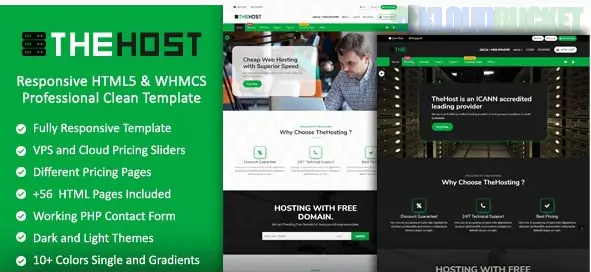
TheHost is a high-performance, premium web hosting template that serves as a bridge between a sleek marketing frontend and the robust backend of WHMCS (Web Host Manager Complete Solution). Built on the latest Bootstrap framework, it is designed for businesses offering Shared Hosting, VPS, and Dedicated Servers.
In 2026, it remains a favorite for hosting providers because it provides a "Big Tech" look with a one-time purchase price.
This template provides a unified experience by combining a full HTML5 website with a matching WHMCS theme:
Massive Page Library: Typically includes 56+ HTML pages, covering everything from "Cloud Hosting" to "Domain Search" and "Terms of Service."
Dynamic Dark & Light Modes: Features a built-in switcher that allows users to toggle the visual theme based on their preference—a standard expectation in 2026.
WHMCS Latest Compatibility: The kit includes a dedicated folder for WHMCS (Syncing with version 8.10+), ensuring your client area (billing, support tickets) looks identical to your homepage.
Color Versatility: Includes 10+ professional color skins (Blue, Green, Purple, etc.), allowing you to brand your hosting company in minutes.
Technical Stack: Coded with clean HTML5, CSS3, and the latest Bootstrap, ensuring fast load times and a "Mobile-First" experience.
Installing TheHost is more involved than a simple WordPress plugin because it involves two distinct parts:
Upload the files from the HTML folder to your main server directory (public_html). You can edit these pages manually or using a code editor to change text, prices, and images.
Locate the Folder: Inside your download, find the WHMCS folder.
Upload Templates: Move the template folder inside to your server's /whmcs/templates/ directory.
Upload Order Forms: Move the order form folder to /whmcs/templates/orderforms/.
Activate: Log in to your WHMCS Admin > System Settings > General Settings and select "TheHost" from the template dropdown.
The "NVMe" Edge: In your pricing tables, highlight modern hardware like NVMe SSDs and DDR5 RAM. TheHost’s pricing blocks are designed to make these tech specs pop.
Trust Signals: Use the built-in "Partners" slider to show logos of technologies you support, such as cPanel, Plesk, LiteSpeed, and CloudLinux.
Interactive Domain Search: Ensure the domain search bar on the homepage is correctly linked to your WHMCS domain checker. This is usually the #1 entry point for new customers.
SEO Advantage: Because it is an HTML5 template (not a heavy CMS like WordPress), it is incredibly fast. Use this speed advantage to rank for local keywords like "Best VPS Hosting in [Your City]."
WHMCS: An active license is required for the billing and client area features.
PHP: 8.1 or higher for the best security and performance.
Server: Any Linux-based server (Apache/Nginx) with an SSL certificate.
Would you like me to help you configure the domain search integration with your WHMCS API, or are you having trouble matching your logo colors to one of the 10 preset skins?
Subscribe to access unlimited downloads of themes, videos, graphics, plugins, and more premium assets for your creative needs.
.jpg) Help Us to Buy More New Theme/Plugin
Help Us to Buy More New Theme/Plugin
Published:
Feb 02, 2026 11:11 AM
Version:
v9.0
Category:
Developer:
ThemeforestLicense:
GPL v2 or Later