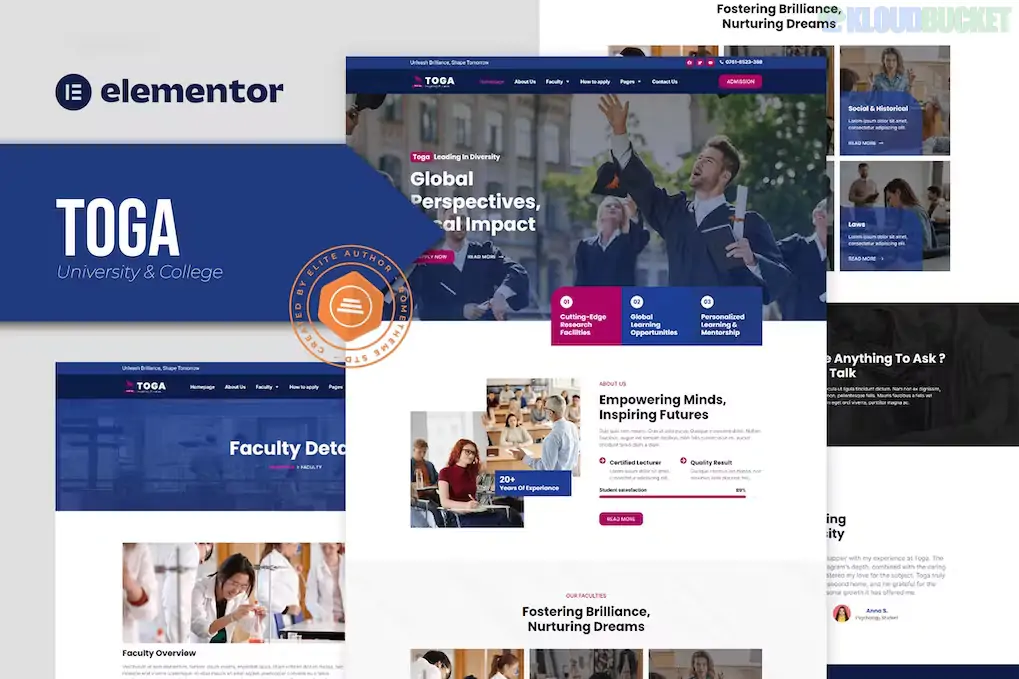
Toga is a modern and highly professional Elementor Template Kit specifically designed for universities, colleges, and educational institutions.1 Developed by Rometheme, it offers a clean, academic aesthetic that focuses on clarity and user navigation, essential for complex educational websites.2
As of late 2025, Toga is a popular choice for institutions looking to launch or refresh their digital presence quickly.3 Unlike a standard theme, it provides a library of pre-designed page layouts that can be imported into a lightweight foundation like the Hello Elementor theme.4
Elementor-Native Experience: Built specifically for the Elementor page builder, offering a drag-and-drop workflow that requires zero coding knowledge.5
Comprehensive Educational Layouts: Includes 12+ pre-designed templates specifically for the academic sector:6
Faculty & Faculty Details: Professional layouts to showcase professors and researchers.
How to Apply: A clear, step-by-step landing page for prospective students.
Facility & Campus: High-resolution gallery and info sections to highlight campus life.
Header & Footer Builder: Comes with specialized blocks for a global header and footer, often powered by the RTMKit Addons, allowing for custom navigation menus and contact information that stays consistent across the site.7
100% Responsive Design: Automatically scales to look perfect on desktops, tablets, and smartphones—a critical requirement for modern student recruitment.8
Global Kit Styles: Allows you to manage your university's brand colors and typography from a single central location, updating the entire site instantly.9
Feature
Details
Developer
Rometheme
Type
Elementor Template Kit (Not a Standalone Theme)
Base Theme
Hello Elementor (Recommended)
Required Plugins
Elementor (Free/Pro), RTMKit Addons, Envato Elements
Latest Status
Active (Maintained for WordPress 6.7+ and PHP 8.3)
Specialty
High performance with minimal plugin bloat
To ensure Toga functions correctly, it is important to follow a specific import sequence:
Environment: Ensure you have the Hello Elementor theme active.10
Global Styles First: Always import the Global Kit Styles before any individual pages.11 This sets up the color palette and font hierarchy.
Template Import: Import your Homepage, About Us, and Faculty pages one by one.12
Header/Footer Setup: Use the RTMKit Theme Builder to assign your imported header and footer templates to the "Entire Site" condition.13
Public and Private Universities: Managing vast amounts of information in a clean, scannable format.
Vocational & Technical Colleges: Highlighting specific "How to Apply" paths for trade certifications.
Online Learning Platforms: Utilizing the "Courses" and "Faculty" sections to sell digital educational content.
Academic Departments: Ideal for individual departments (e.g., the School of Engineering) that need a distinct site while maintaining an academic feel.
Pro Tip: In 2026, accessibility is a priority for educational institutions. Use Toga’s clean, high-contrast typography to ensure your site meets WCAG (Web Content Accessibility Guidelines) standards. Since Toga is built on Elementor, you can also easily add "Alt Text" to all your campus images directly within the editor to improve SEO and screen-reader compatibility.
Would you like me to find a comparison between Toga and Universite to see which one has the more advanced "Course Search" functionality?
How to Import Elementor Template Kit
This video provides a practical, visual walkthrough of the import process, which is the most critical step in setting up a template kit like Toga correctly.
Subscribe to access unlimited downloads of themes, videos, graphics, plugins, and more premium assets for your creative needs.
.jpg) Help Us to Buy More New Theme/Plugin
Help Us to Buy More New Theme/Plugin
Published:
Dec 17, 2025 16:16 PM
Category:
Author:
OtherLicense:
GPL v2 or Later