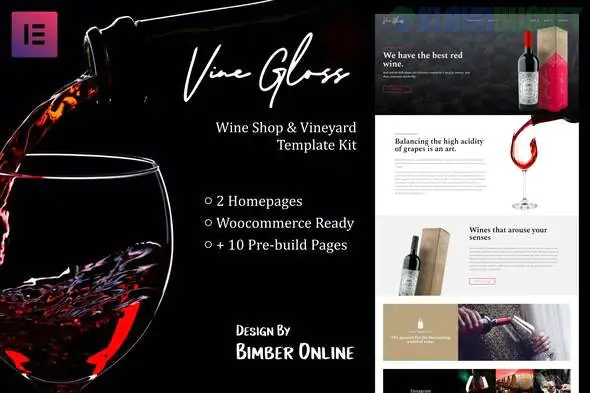
**Vine Gloss** is a sophisticated and elegant Elementor Template Kit designed for wine shops, vineyards, and boutique liquor stores. It leans into a luxury aesthetic, featuring a dark, moody color palette with high-contrast typography and high-resolution imagery—perfect for conveying the "premium" nature of a vineyard.
Here is the strategic breakdown for setting up **Vine Gloss**.
---
## 🍷 What’s Inside the Vine Gloss Kit?
This is a full-site kit, meaning it covers both the informational side (the winery) and the e-commerce side (the shop).
* **2 Homepage Styles:** One focused on the vineyard story and another more conversion-oriented for the shop.
* **18+ Total Templates:** Including "Our Story," "Vineyard Tour," "Wine Tasting," and "FAQ."
* **WooCommerce Ready:** Dedicated templates for the **Shop Archive**, **Single Product** pages, **Cart**, and **Checkout**.
* **Age Verification Popup:** A crucial legal requirement for alcohol sales, built directly into the kit.
* **Theme Builder Templates:** Custom Header, Footer, and 404 pages.
---
## 🛠️ Technical Requirements
**Important:** Unlike some of the free-plugin kits we discussed, Vine Gloss is a "Pro" level kit.
* **Elementor Pro:** **Required.** It uses the Pro "Theme Builder" for the headers, footers, and WooCommerce product layouts.
* **WooCommerce:** Required if you plan to sell wine online.
* **The Plus Addons for Elementor:** Often used in this kit to provide the advanced "luxury" widgets and grid layouts.
* **Hello Elementor Theme:** The recommended lightweight base.
---
## 🚀 The Vine Gloss Setup Guide
Because this kit handles sensitive shop pages, the order of import is critical:
1. **Preparation:** Install **Hello Elementor**, **Elementor Pro**, and the **Template Kit Import** plugin.
2. **Upload & Requirements:** Upload your `vine-gloss-kit.zip`. Click the **orange "Install Requirements"** button to automatically add **The Plus Addons** and **WooCommerce**.
3. **The "Global" Rule:** Import the **Global Kit Styles** first. This sets the deep burgundies, blacks, and golds that give the site its "wine cellar" feel.
4. **WooCommerce Pages:** Before importing the shop templates, ensure you have gone through the basic WooCommerce setup wizard so the Cart and Checkout pages exist.
5. **Theme Builder:** After importing, go to `Templates > Theme Builder` to ensure your Wine Shop **Header** and **Footer** are assigned to the "Entire Site."
---
## 🍇 Vineyard Customization Tips
* **Visual Storytelling:** Wine is an emotional purchase. Replace stock photos with shots of your actual vines, the barrels in your cellar, and the "legs" of the wine in a glass.
* **Age Gate:** Customize the **Age Verification Popup** immediately. Ensure the "Exit" button redirects to a safe site (like Google) and the "Enter" button matches your local legal drinking age.
* **Tasting Notes:** Use the "Single Product" template to add custom fields for **Tasting Notes**, **Aroma**, and **Food Pairings**. This helps customers shop by flavor profile.
* **Typography:** This kit uses elegant serif fonts. Keep these consistent—they are what give the site its "expensive" feel.
---
**Would you like me to help you write the "Tasting Notes" or "Our Story" sections, or are you having trouble with the Age Verification popup not appearing?**
Subscribe to access unlimited downloads of themes, videos, graphics, plugins, and more premium assets for your creative needs.
.jpg) Help Us to Buy More New Theme/Plugin
Help Us to Buy More New Theme/Plugin
Published:
Feb 02, 2026 09:58 AM
Category:
Author:
OtherLicense:
GPL v2 or LaterTags: