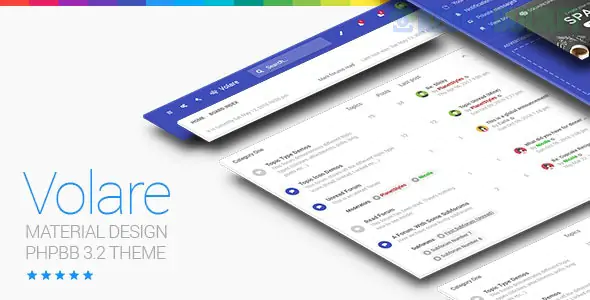
Volare is a significant departure from the WordPress themes we’ve discussed. It is a premium professional style for phpBB 3.3, the world’s most popular open-source bulletin board software.
While Palmela handles transactions and Shadowcat handles news, Volare is built specifically for community discussion. It uses Google’s Material Design language to transform the traditionally dated look of forums into a modern, app-like experience.
Material Design UI: It brings the familiar look of Android and Google apps to your forum, utilizing "cards," subtle shadows, and a clean grid system.
Fully Responsive: Unlike older forum styles that struggle on mobile, Volare is built from the ground up to behave like a native mobile app on smartphones.
Advanced Sidebar: It includes a customizable sidebar where you can place "Top Posters," "Recent Topics," or custom advertisements.
Color Scheme Customization: It typically comes with a wide array of pre-defined color palettes (Blue, Red, Green, Teal, etc.) that can be changed with a single line of code.
Custom Graphics: Includes unique Material-style icons for "Read" vs. "Unread" forums, which are much cleaner than the default phpBB "bubbles."
The primary challenge for forums today is competing with social media (Reddit, Discord, Facebook). Volare solves this by improving the User Experience (UX):
Readability: Material Design focuses on typography and whitespace, making long threads much easier to read.
Navigation: The "Floating Action Buttons" (FAB) and simplified headers make it easier for users to post new topics.
Familiarity: Because users are used to Google’s design language, there is almost no learning curve when they join your community.
If you are building a large project, you might combine several of the themes you’ve asked about:
The Hub (WordPress): Use Strix or Digee for your main company website.
The Shop (WooCommerce): Use Gem to sell products.
The Community (phpBB): Use Volare to host a discussion forum where your users can interact.
Since Volare is a phpBB theme (not WordPress), the installation process is different:
Upload the theme folder to the /styles/ directory of your phpBB installation.
Go to the Admin Control Panel (ACP) -> Customise -> Install Styles.
Pro-Tip: If you are using extensions (like a "Thanks" for posts or "Advanced News"), make sure to check the Volare support documentation, as Material Design themes sometimes require small CSS tweaks to make 3rd-party extensions look seamless.
Are you setting up a brand-new community or migrating an old forum to a modern look? I can help you decide which "Style" configuration will best suit your community's niche (e.g., Tech, Gaming, or Support).
Subscribe to access unlimited downloads of themes, videos, graphics, plugins, and more premium assets for your creative needs.
.jpg) Help Us to Buy More New Theme/Plugin
Help Us to Buy More New Theme/Plugin
Published:
Jan 02, 2026 11:11 AM
Version:
v1.1.6
Category:
Developer:
ThemeforestLicense:
GPL v2 or Later