The product you are asking about, "WooCommerce Ajax Cart & Added To Cart Popup - Floating/Sliding/Popup All in One Cart/Checkout Plugin" (often titled Ultimate WooCommerce Ajax Cart), is a premium, feature-rich plugin designed to significantly improve the user experience and conversion rate of a WooCommerce store.
It achieves this by eliminating full page reloads and offering flexible ways for customers to view and interact with their cart.
Here is a breakdown of its key features, focusing on the "All in One" capabilities:
The plugin combines three high-impact cart displays into a single solution:
You can choose how the cart is presented to the user:
Slide-In (Side Cart/Drawer): The cart panel slides in from the side (usually left or right) of the screen, allowing users to continue browsing the main page.
Floating (Sticky Cart Tab): A small, customizable icon or tab remains visible and "floating" on the page (e.g., bottom-right), which opens the cart panel when clicked.
Popup (Modal): The cart appears as a centered modal window that overlays the main content.
When a customer clicks "Add to Cart," the plugin intercepts the action using AJAX (no page refresh) and can:
Immediately open the Floating/Slide-In cart panel to show the newly added item.
Trigger a subtle notification or animation (like an item flying to the floating icon).
Display a customizable success popup with key details.
This is a major conversion feature. Instead of forcing the customer to visit the separate Cart page, the plugin allows them to:
Load the Checkout Form directly inside the floating/slide-in panel.
Complete the entire checkout process (entering details and placing the order) without ever leaving the page they are currently viewing. This drastically reduces checkout friction and cart abandonment.
The plugin goes far beyond basic display options to offer detailed customization and revenue-boosting tools:
Feature Category
Key Features
Performance
Fully AJAX-Powered: All actions—adding, removing, or changing product quantities—are done instantly without page reloads.
Customization
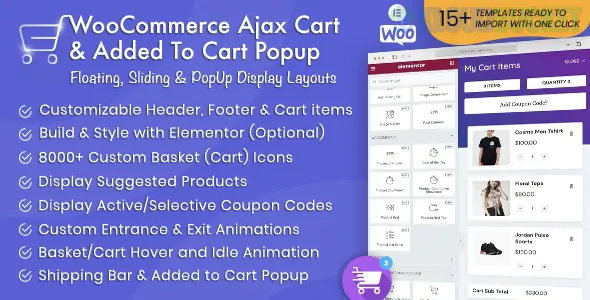
Elementor Integration: Includes built-in Elementor elements (widgets) to allow custom design of the cart panel using the visual builder. Also offers ready-made templates.
Design
Layout & Styling: Choose from 11 different Cart Button Shapes (Circle, Square, Star, Animating Blob, etc.), set glass morphism effects, customize colors, and select from Grid or List product layouts within the cart.
Upselling
Suggested Items: Display cross-sell, up-sell, or related products (as a carousel or grid) directly within the mini-cart panel to encourage additional purchases and increase Average Order Value (AOV).
Coupons
Inline Coupon Input: Allows customers to enter and apply coupon codes directly within the floating/slide-in cart panel without reloading the page.
Visibility Control
Conditional Display: Choose to show or hide the cart button and panel on specific pages, posts, products, or restrict visibility to desktop or mobile devices only.
User Experience
Animations: Customize entrance, exit, and hover animations for the cart button and panel.
This plugin is ideal for store owners who want to offer a fast, modern, single-page shopping experience akin to what major e-commerce platforms use.
Would you like to know the steps for integrating the Elementor custom cart design or how to set up the suggested items for cross-promotion?
Subscribe to access unlimited downloads of themes, videos, graphics, plugins, and more premium assets for your creative needs.
.jpg) Help Us to Buy More New Theme/Plugin
Help Us to Buy More New Theme/Plugin
Published:
Dec 07, 2025 15:24 PM
Category:
Author:
OtherLicense:
GPL v2 or Later