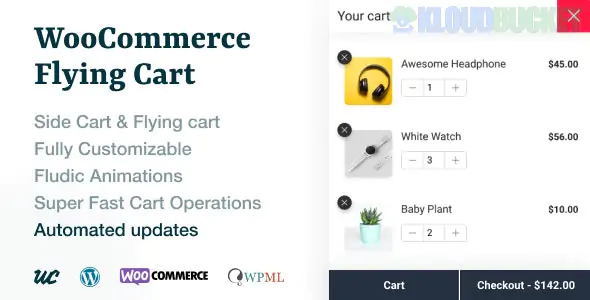
**WooCommerce Flying Cart** by **WeCreativeZ** is a premium WordPress plugin (available on CodeCanyon) designed to improve the shopping experience by adding a persistent, floating mini-cart to your store.
It allows customers to view, manage, and even check out their items without ever leaving the page they are currently browsing.
---
### ## Key Features
* **AJAX Navigation:** Products are added to the cart instantly without a page refresh, keeping the shopping flow uninterrupted.
* **Persistent Floating Icon:** A customizable cart icon "floats" on the screen (usually in the corner), following the user as they scroll.
* **Quick Cart Management:** Users can increase/decrease quantities or remove items directly within the flying cart popup.
* **Coupon Support:** Customers can apply discount codes directly in the mini-cart rather than waiting until the checkout page.
* **Slide-In or Popup Layouts:** You can choose between a side-drawer (sliding from the left or right) or a centered popup box.
* **Device Control:** Options to enable or disable the flying cart specifically for mobile or desktop users.
---
### ## Why Store Owners Use It
1. **Reduce Cart Abandonment:** By making the cart always visible and easy to access, users are less likely to forget what they've added.
2. **Faster Checkout:** It streamlines the path to purchase by removing the need to navigate to a separate `/cart/` page.
3. **Visual Appeal:** The plugin includes modern animations (7+ styles) that make the "Add to Cart" action feel more responsive and high-end.
### ## Comparison: Flying Cart vs. Standard Cart
| Feature | Standard WooCommerce Cart | WeCreativeZ Flying Cart |
| --- | --- | --- |
| **Location** | Dedicated Page (`/cart`) | Floating Overlay on every page |
| **Add to Cart** | Often reloads the page | 100% AJAX (No reload) |
| **Interruption** | High (User must leave shop) | Zero (Stay on product page) |
| **Mini-Management** | Limited to header widgets | Full control (Quantity/Coupons) |
---
### ## Technical Requirements
* **WooCommerce:** Version 6.x through 9.x (Compatible with the latest 2025 updates).
* **WordPress:** Version 5.0 or higher.
* **Theme Compatibility:** Works with major themes like Elementor (Hello), Avada, Divi, and Astra.
> **Pro Tip:** If you want the "Fly to Cart" animation (where the product image physically flies into the icon), ensure your theme doesn't have a "Redirect to cart page after successful addition" setting enabled in the WooCommerce core settings.
**Would you like me to help you find the CSS code to change the floating icon's color to match your specific brand hex code?**
Subscribe to access unlimited downloads of themes, videos, graphics, plugins, and more premium assets for your creative needs.
.jpg) Help Us to Buy More New Theme/Plugin
Help Us to Buy More New Theme/Plugin
Published:
Dec 28, 2025 17:30 PM
Version:
v1.7.0
Category:
Author:
OtherLicense:
GPL v2 or LaterTags: