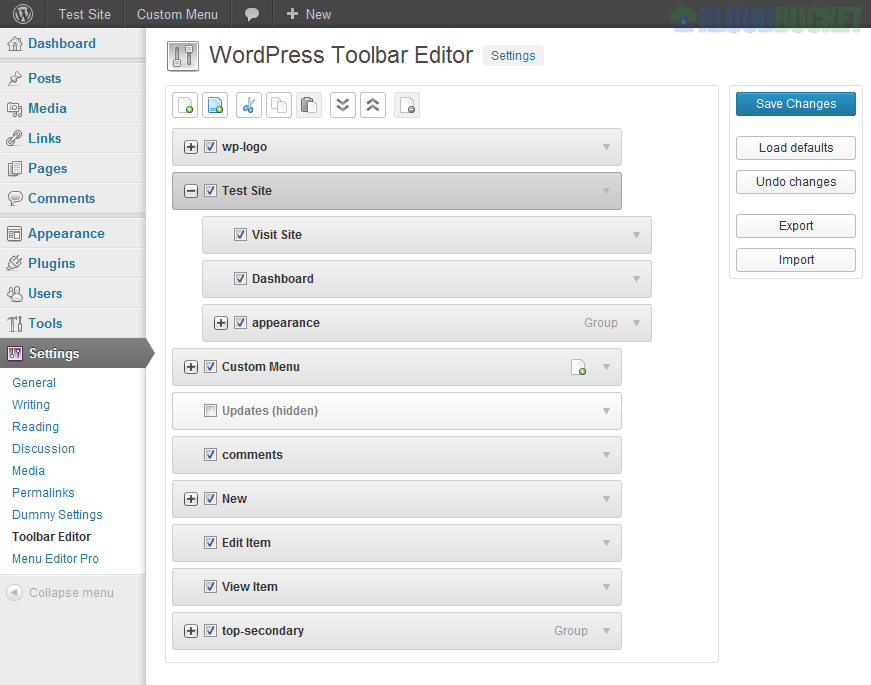
The WordPress Toolbar Editor Pro Addon refers to a premium extension or feature set designed to provide advanced control over the WordPress Admin Bar (also known as the Toolbar—the horizontal menu that appears at the top of the screen when you're logged in).
It's often sold as an add-on to a popular plugin like Admin Menu Editor Pro or included within a comprehensive admin dashboard management suite like WP Adminify or Better Admin Bar Pro.
The "Pro" features go beyond simple hiding and adding links, focusing on user experience, branding, and access control:
Drag-and-Drop Reordering: Easily rearrange existing, default, and custom items with an intuitive interface.
Custom Links & Submenus: Add new menu items pointing to any internal or external URL, and create multi-level nested submenus for organized navigation.
Advanced Styling Options: Customize the visual appearance of the toolbar, including:
Custom background colors/gradients.
Personalized text colors and hover effects.
Customizing the appearance of the "New" button.
Branding: Easily replace the default WordPress logo with your own brand logo for white-labeling client sites.
Granular Visibility: The most critical Pro feature is the ability to control who sees what on the toolbar. You can hide specific items or entire groups based on:
User Roles (e.g., hide developer tools for Editors or Contributors).
Specific Usernames (e.g., disable the toolbar for selected users).
Frontend Toolbar Management: Provides complete control over whether the toolbar is visible to specific users on the public-facing side of the website.
Custom Toolbar Views: Configure different toolbar layouts tailored specifically for various user roles, simplifying the workspace for your team members or clients.
Export/Import Settings: Allows you to save your custom toolbar configuration and easily migrate it to other websites or store it as a backup.
Fixing Overflow: Some Pro versions include features to help solve overflow issues where too many plugin-added items cause the toolbar to look messy or break its layout.
The goal of using a Pro Toolbar Editor is to streamline the admin experience and enforce brand consistency across client sites without needing to write custom PHP code.
You can learn how to easily organize your menus using an admin bar editor in this video: WordPress Toolbar or Admin Bar Editor Plugin.
Subscribe to access unlimited downloads of themes, videos, graphics, plugins, and more premium assets for your creative needs.
.jpg) Help Us to Buy More New Theme/Plugin
Help Us to Buy More New Theme/Plugin
Published:
Dec 09, 2025 13:12 PM
Version:
v1.5
Category:
Author:
OtherLicense:
GPL v2 or Later