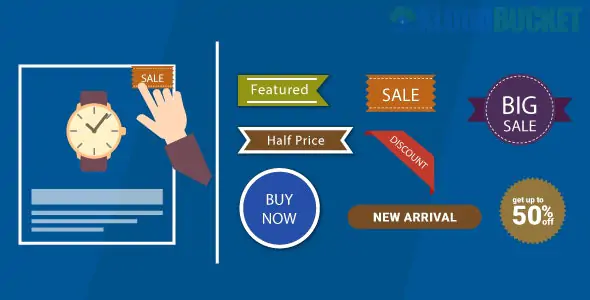
WooCommerce Badge Manager is a powerful marketing tool used to add custom labels, ribbons, and badges to product images. These visual cues are essential for grabbing customer attention and highlighting specific attributes like "New Arrival," "On Sale," "Best Seller," or "Limited Stock."
While several plugins share this name, the most popular versions (such as those by Crevol or wpmessiah) focus on automating the badge assignment process through conditional logic.
The Pro versions of these plugins offer deep customization and automation that standard WooCommerce "Sale" flashes cannot provide:
Conditional Automation: Automatically apply badges based on:
Stock Status: "Low Stock," "Sold Out," or "Backorder."
Product Attributes: Highlight "Organic," "Eco-Friendly," or specific sizes/colors.
Sales Performance: Automatically mark "Bestsellers" based on total sales count.
Time-Based: Mark products as "New" for a set number of days after they are published.
Discount Percentage: Dynamically show "20% OFF" or "Save $50" instead of a generic "Sale" text.
Badge Library & Customization:
Pre-made Sets: Access to 100+ seasonal and promotional badges (Black Friday, Christmas, etc.).
Custom Uploads: Use your own SVG or PNG icons for perfect brand alignment.
Editor: Adjust colors, typography, rotation, opacity, and positioning (15+ positions available).
Urgency Tools:
Countdown Timers: Add a live timer directly onto the badge for flash sales (e.g., "Ends in 02:45:00").
Quantity Rules: Show a "Hurry! Only 3 left" badge only when stock falls below a certain threshold.
Mobile Responsive: Badges are designed to scale down appropriately so they don't cover the entire product on small screens.
Archive Filtering: Some versions allow customers to filter products in your shop by their badge type (e.g., "Show only New Arrivals").
Bulk Management: Apply or remove badges from entire categories or tags in one click, rather than editing products individually.
Z-Index Control: Ensure badges sit correctly on top of images without being hidden by theme elements or lightboxes.
Create a Badge: Go to the "Badge Manager" menu and design your label (text, color, or image).
Set the Rules: In the "Conditions" tab, define who sees the badge.
Example: Category = "Laptops" AND Stock < 5.
Position It: Use the live preview to place the badge (Top Left, Center, Bottom Right, etc.).
Schedule (Optional): Set a start and end date for the badge to automatically appear and disappear for seasonal promotions.
Plugin
Key Strength
Version
YITH Badge Management
Best-in-class UI and rule logic.
Pro
Product Labels by Acowebs
Extremely user-friendly and great free version.
Free/Pro
BeRocket Advanced Labels
Most advanced conditional logic for large stores.
Pro
Better Badge
Huge library of 100+ built-in holiday presets.
Pro
Would you like me to help you write a custom CSS snippet to make your badges "pulse" or animate to attract even more attention?
Subscribe to access unlimited downloads of themes, videos, graphics, plugins, and more premium assets for your creative needs.
.jpg) Help Us to Buy More New Theme/Plugin
Help Us to Buy More New Theme/Plugin
Published:
Jan 02, 2026 15:41 PM
Version:
v2.4.9
Category:
Author:
OtherLicense:
GPL v2 or Later