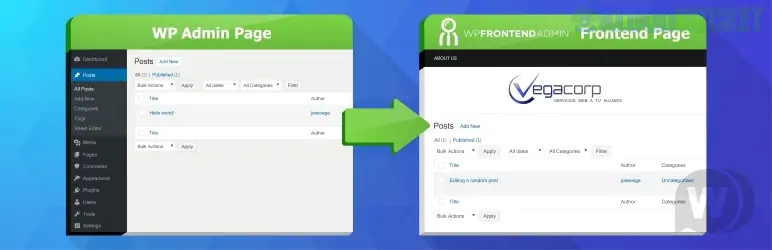
WP Frontend Admin (Premium) is a powerful tool designed to "frontend-ify" your WordPress experience. It essentially takes any part of the standard WordPress backend (wp-admin) and displays it on your public-facing site, allowing users to manage content without ever seeing the "scary" WordPress dashboard.
By 2026, it has become a go-to solution for developers building SaaS platforms, client portals, and multi-vendor marketplaces.
While the free version allows basic page conversion, the Premium version unlocks the tools necessary for a professional-grade dashboard:
Hide/Rename Elements: Use a "click-to-hide" interface to remove distracting sidebars, footer credits, or specific fields (like SEO settings) from the frontend view.
Custom Design & Branding: White-label the dashboard with your own logo and colors. It automatically inherits your theme’s CSS so it feels like a native part of your site.
Role-Based Access: Create specific dashboards for different user roles (e.g., a "Store Manager" only sees WooCommerce orders, while an "Author" only sees their own posts).
No-Code Web Apps: Turn plugins like WooCommerce, LearnDash, or Events Calendar into a frontend app experience for your clients.
The official pricing generally offers both annual and lifetime options.
Plan
Sites
Price (Approx.)
Best For
Standard
1 Site
$49 / year
Single business owners or bloggers.
Professional
5 Sites
$99 / year
Freelancers managing a few client sites.
Platform
Unlimited
$199 / year
Agencies and SaaS creators (includes Multisite support).
Lifetime
1–Unlimited
$119 – $399
One-time payment for long-term projects.
The standout feature of this plugin is the "View on Frontend" button.
Navigate: Go to any page in your WordPress admin (e.g., the "Products" list).
Convert: Click the "Edit on Frontend" button in the top admin bar.
Clean Up: Use the "Quick Settings" panel on the left to hide menus or buttons you don't want the user to see.
Save: Publish the page. It is now a live frontend URL that only authorized users can access.
These are often confused, but they serve different purposes:
WP User Frontend: Best for forms. You build a form from scratch for users to submit posts.
WP Frontend Admin: Best for dashboards. It takes the existing admin interface and moves it to the frontend.
Client Portals: Give a client a "Settings" page where they can update their business phone number without touching the rest of the site.
Marketplaces: Let vendors manage their own WooCommerce products and coupons on the frontend.
Learning Management: Allow teachers to grade assignments and create lessons without backend access.
Would you like me to help you set up a specific dashboard, or perhaps compare this with a "form-based" alternative like ACF Frontend?
Subscribe to access unlimited downloads of themes, videos, graphics, plugins, and more premium assets for your creative needs.
.jpg) Help Us to Buy More New Theme/Plugin
Help Us to Buy More New Theme/Plugin
Published:
Jan 06, 2026 17:43 PM
Version:
v1.21.2
Category:
Author:
OtherLicense:
GPL v2 or LaterTags: