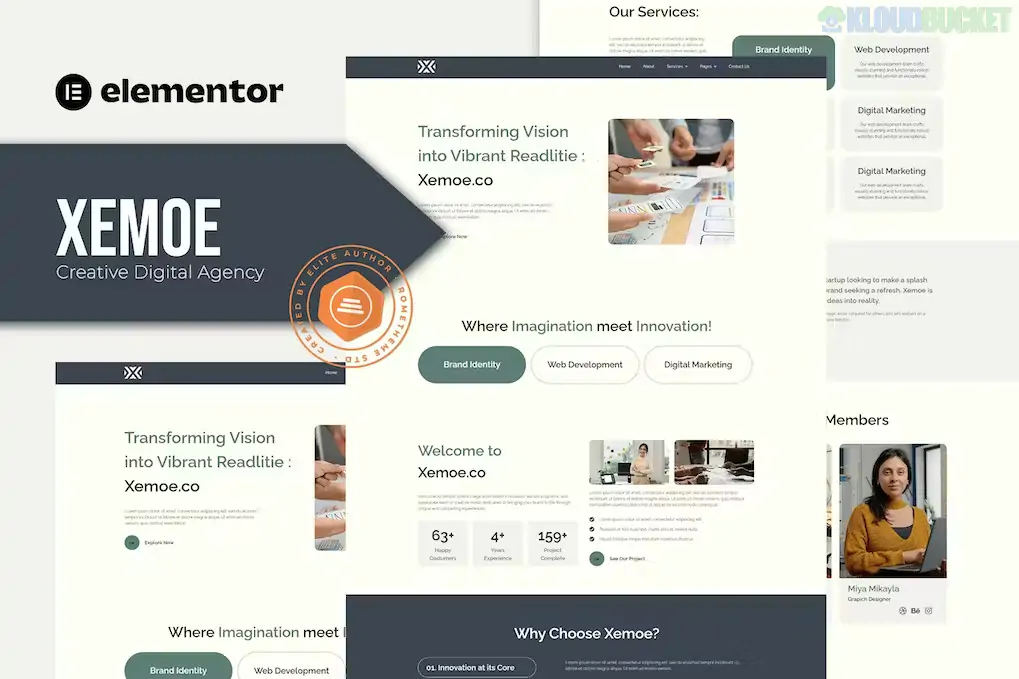
Xemoe is a bold, modern Elementor Template Kit designed specifically for digital creative agencies, branding studios, and portfolio websites. Developed by Rometheme, it features a unique, high-contrast aesthetic that balances dark and light elements to create a sophisticated, technical feel.
By late 2025, it has become a popular alternative for those who want an "agency-premium" look without requiring an Elementor Pro subscription, as it is built using mostly free tools.
Modern & Unique Design: Stands out with a creative layout that includes overlapping elements, elegant typography, and clean white space.
12+ Pre-built Templates: Provides a full set of pages needed for a complete agency launch:
Homepage: A professional landing page with high-impact hero sections.
Services & Service Details: Detailed layouts to showcase your creative and technical offerings.
Portfolio & Portfolio Details: Clean grids to display your best work with dedicated case study pages.
Team & FAQ: To build trust and answer common client questions.
Elementor Pro Not Required: Built using RomethemeKit and RomethemeForm, which allow you to create custom headers, footers, and forms for free.
100% Fully Responsive: Manually optimized for mobile-first browsing, ensuring the site looks sharp on all devices.
Global Kit Styles: Centralized control for all brand colors and fonts, allowing for instant site-wide branding updates.
Feature
Details
Developer
Rometheme
Type
Elementor Template Kit (Not a Standalone Theme)
Base Theme
Hello Elementor (Recommended)
Required Plugins
Elementor (Free), RomethemeKit, RomethemeForm, ElementsKit Lite
Latest Status
Active (Maintained for WordPress 6.7+ and PHP 8.2+)
Performance
Lightweight and optimized for fast-loading agency showcases
Since Xemoe is a Template Kit, it requires a specific import order to maintain the design integrity:
Preparation: Activate the Hello Elementor theme and ensure your permalinks are set to "Post Name."
Plugin Setup: Install Elementor, Envato Elements, and the required Rometheme addons.
Global Styles: Import the Global Kit Styles first to set your typography and color foundations.
Header & Footer: Go to RTMKit > Theme Builder to create and assign your header and footer templates to the "Entire Site" before importing individual pages.
Digital & Creative Agencies: Using the technical but artistic layout to project a high-end brand image.
Branding & Design Studios: Highlighting visual assets and logo designs through the clean portfolio pages.
Freelance Web Developers: Providing a professional framework to showcase technical skills and completed projects.
Marketing Firms: Utilizing the "Services" and "Case Study" blocks to explain complex marketing strategies and results.
Pro Tip: For 2026, Xemoe’s minimalist typography is its greatest strength. To make your site even faster, use WebP images and only import the specific page templates you need. This keeps your "DOM size" small and ensures your creative work loads instantly for high-profile leads.
Would you like me to find a tutorial on how to use RomethemeForm to set up a custom "Project Inquiry" form for your new site?
How to Make a Business Website using Elementor (2025)
This masterclass is highly relevant because it covers the fundamental steps of building a digital agency website from scratch using the same Elementor-based workflow required for the Xemoe kit.
Subscribe to access unlimited downloads of themes, videos, graphics, plugins, and more premium assets for your creative needs.
.jpg) Help Us to Buy More New Theme/Plugin
Help Us to Buy More New Theme/Plugin
Published:
Dec 17, 2025 16:12 PM
Category:
Author:
OtherLicense:
GPL v2 or Later