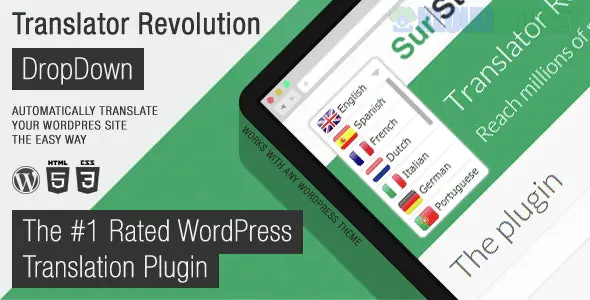
Ajax Translator Revolution DropDown is a highly efficient, automated translation plugin for WordPress that allows you to transform your website into a multilingual platform in minutes. Developed by SurStudio, it leverages AJAX technology to provide seamless translations without requiring a full page reload, ensuring a smooth user experience.
In late 2025, it remains a favorite for site owners who need a fast, low-maintenance solution for global audiences, supporting over 100 languages.
Automatic Translation: Uses powerful translation engines (like Google Translate API) to translate your content automatically, saving hundreds of hours of manual work.
AJAX-Powered Navigation: Users can switch languages via a dropdown menu, and the content updates instantly on the current page without refreshing the entire browser.
Granular Content Control: You can choose to translate your entire site or exclude specific pages, posts, or categories that you want to keep in the original language.
90+ Customizable Settings: Offers deep customization for the dropdown's appearance, including:
Flag & Name Styles: Choose between showing just flags, just language names, or both.
Advanced Positioning: Place the translator widget anywhere using shortcodes, widgets, or automatic placement in the header/footer.
User Preference Memory: Remembers the visitor's language choice so the site stays in their preferred language on return visits.
Compatibility: Works out-of-the-box with popular tools like Elementor, Gutenberg, bbPress, WooCommerce, and BuddyPress.
Import/Export Tool: Easily move your settings and cached translations from one site to another.
Feature
Details
Developer
SurStudio
Languages Supported
103+ (Automatic)
Framework
jQuery / AJAX
Gutenberg Optimized
Yes
Last Updated
July 31, 2025 (v2.x)
Price
~$25 (Single license on CodeCanyon)
Unlike "deep" translation plugins like WPML that create separate database entries for every translated page, Ajax Translator Revolution acts as a "layer" on top of your existing content. This makes it incredibly fast to set up but different in its approach to SEO.
Installation: Upload the plugin and activate it. It integrates directly into the WordPress admin sidebar.
Configuration: Access the tabbed admin panels to select your primary language and the list of available languages for visitors.
Dropdown Styling: Use the visual settings to match the dropdown colors and borders to your theme's branding.
Widget Placement: Add the "Translator Revolution" widget to your sidebar or header to make it visible to users.
International Blogs & Portfolios: Where quick access to multiple languages is more important than specific SEO for every single translated page.
Support Forums & Communities: Ideal for bbPress and BuddyPress sites where user-generated content needs to be understood by a global member base.
Landing Pages: For marketing campaigns targeting multiple countries simultaneously.
Small to Mid-sized E-commerce: Providing a localized shopping experience for WooCommerce customers without the overhead of massive translation databases.
Pro Tip: If you are focused on SEO, be aware that because this plugin often uses JavaScript/AJAX to swap content, Google may only index your "primary" language. For 2026, if you need every language to be fully indexable by search engines, consider using this plugin's "Static" translation options or pairing it with a plugin that supports language-specific URLs (like yoursite.com/es/).
Would you like me to find a comparison between Ajax Translator Revolution and GTranslate to see which one offers better performance for a heavy WooCommerce site in 2026?
How to do AJAX in WordPress correctly (2025)
This technical guide explains the mechanics of AJAX within WordPress, which is exactly how this plugin handles data to translate your site without page reloads.
Subscribe to access unlimited downloads of themes, videos, graphics, plugins, and more premium assets for your creative needs.
.jpg) Help Us to Buy More New Theme/Plugin
Help Us to Buy More New Theme/Plugin
Published:
Dec 17, 2025 16:08 PM
Version:
v2.2
Category:
Author:
OtherLicense:
GPL v2 or Later