gAppointments is a premium extension that transforms Gravity Forms into a complete appointment booking and scheduling system. It allows businesses—like clinics, salons, law firms, and personal trainers—to take control of their calendars directly within their WordPress site without relying on expensive third-party monthly subscriptions.
Because it is an add-on for Gravity Forms, you get the combined power of the world’s most robust form builder with a professional-grade booking engine.
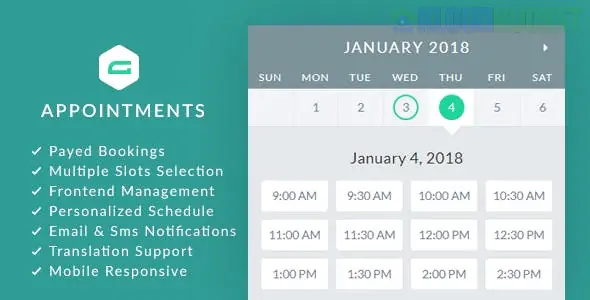
Calendar View: A clean, user-friendly front-end calendar that lets clients pick dates and available time slots.
Service & Provider Management: Assign different "Services" (e.g., "Consultation," "Massage") to different "Providers" (staff members), each with their own unique schedule.
Automatic Time Slots: Simply set your working hours and appointment duration, and the plugin will automatically generate available slots.
Capacity Control: Set how many people can book the same time slot (perfect for group classes or workshops).
Payment Integration: Since it works with Gravity Forms, you can use any Gravity Forms payment add-on (Stripe, PayPal, Square) to charge for bookings upfront.
The plugin offers deep control over the "logic" of your bookings:
Feature
Description
Booking Lead Time
Prevent last-minute bookings by requiring appointments to be made $X$ hours in advance.
Blackout Dates
Easily mark holidays or staff vacations so no appointments can be scheduled.
Multi-Slot Booking
Allow clients to select multiple time slots or recurring appointments in a single submission.
Pending/Approved Workflow
Choose to automatically approve bookings or hold them in "Pending" until an admin reviews them.
Email Reminders
Send automated confirmation and reminder emails to both the client and the staff member.
To use gAppointments, you must have:
WordPress: A self-hosted installation.
Gravity Forms: An active license (Pro or Elite is recommended if you need payment integration).
PHP Version: $7.4$ or higher is recommended for optimal performance.
Install the Add-on: Upload the gAppointments .zip file via Plugins > Add New.
Configure Services: Go to the gAppointments menu and create your Services (Set duration, price, and buffer times).
Setup Providers: Add your staff members and define their specific working hours.
Create the Form:
Go to Forms > New Form.
Drag and drop the gAppointments field into your form.
In the field settings, select which Service or Provider this form should display.
Configure Feeds: Go to Form Settings > gAppointments to map your form fields (Name, Email) to the booking engine.
Embed & Launch: Use the Gravity Forms block or shortcode to place the booking calendar on your page.
The biggest advantage is data ownership and flexibility. Unlike SaaS booking tools (like Calendly or Acuity), your data stays in your WordPress database. Furthermore, you can use Gravity Forms' Conditional Logic to create highly complex booking journeys—for example, showing different calendars based on a user's previous answers in the form.
Would you like me to help you set up "Buffer Times" between appointments to give your staff a break, or do you need help connecting the booking form to a payment gateway like Stripe?
Subscribe to access unlimited downloads of themes, videos, graphics, plugins, and more premium assets for your creative needs.
.jpg) Help Us to Buy More New Theme/Plugin
Help Us to Buy More New Theme/Plugin
Published:
Dec 25, 2025 16:45 PM
Version:
v1.14.1
Category:
Author:
OtherLicense:
GPL v2 or LaterTags: