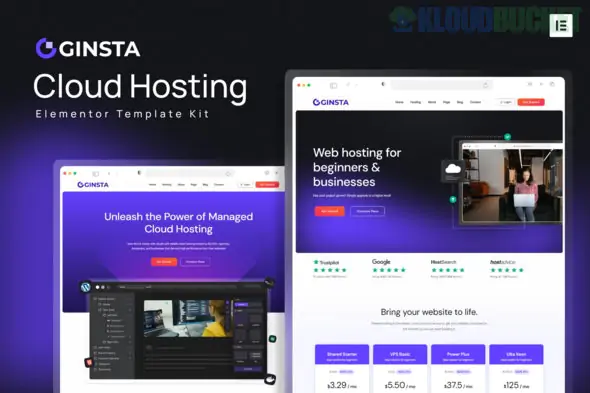
Ginsta is a high-performance Elementor Template Kit designed for cloud hosting companies, domain registrars, and technology infrastructure providers. It features a tech-forward, clean design with vibrant blue accents, perfect for establishing trust in the competitive web hosting market.
Notably, Ginsta is built to be highly accessible, as it works primarily with free plugins, avoiding the immediate need for an Elementor Pro subscription for most features.
The kit is comprehensive, offering 20+ pre-designed templates to help you launch a hosting business quickly:
Strategic Layouts:
Homepages (2 Variations): High-impact designs featuring "Search Domain" bars and pricing table highlights.
Hosting Services: Specific layouts for Shared Hosting, VPS Hosting, and Dedicated Servers.
Pricing Tables: Clear, easy-to-read grids comparing different plan features (storage, RAM, bandwidth).
Knowledge Base: Dedicated templates for documentation, FAQs, and detail pages to reduce support tickets.
Agency Essentials:
About & Team: Pages to showcase your data center locations and technical experts.
Review/Testimonials: Built-in sections for customer feedback and case studies.
Contact: Integrated with MetForm for professional inquiry management.
Ginsta is designed to be lightweight and doesn't require Elementor Pro for its core layouts. It utilizes the following free tools:
Elementor (Free): The core drag-and-drop page builder.
ElementsKit Lite: Used for building the professional header, footer, and complex mega-menus.
MetForm: A free plugin used for the custom contact and domain inquiry forms.
Jeg Elementor Kit: Provides additional stylistic widgets and advanced UI components.
Hello Elementor Theme: The recommended "blank canvas" theme for maximum speed.
Retina Ready & Responsive: Every page is optimized for 4K monitors and mobile phones, ensuring your server stats and pricing look sharp everywhere.
Professional Hosting Icons: The kit includes modern, industry-specific iconography for "Cloud," "SSD," "Security," and more.
Cross-Browser Compatible: Tested and optimized for Chrome, Firefox, Safari, and Edge.
Install the Envato Elements plugin from the WordPress repository.
Go to Elements > Installed Kits and upload the Ginsta ZIP file.
Click the "Install Requirements" button in the orange banner to automatically download the necessary free plugins (MetForm, ElementsKit, etc.).
Crucial: Import the Global Kit Styles first to set the typography and "Hosting Blue" color palette before importing individual pages.
Would you like me to help you set up a "Domain Search" widget that connects to a domain registrar like Namecheap or WHMCS?
Subscribe to access unlimited downloads of themes, videos, graphics, plugins, and more premium assets for your creative needs.
.jpg) Help Us to Buy More New Theme/Plugin
Help Us to Buy More New Theme/Plugin
Published:
Jan 02, 2026 14:41 PM
Category:
Author:
OtherLicense:
GPL v2 or Later