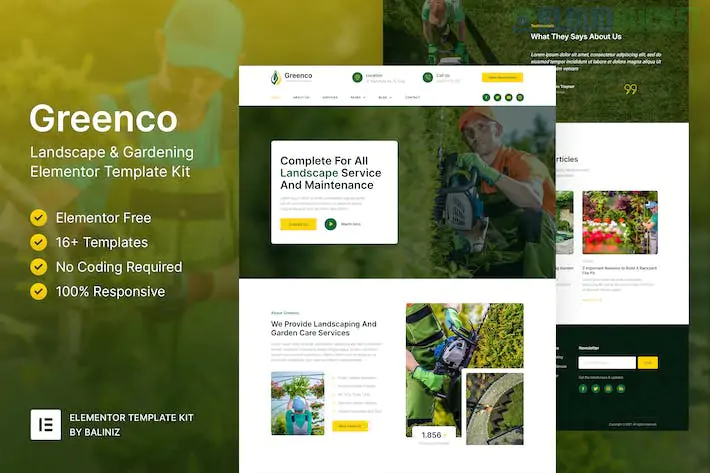
Greenco is a fresh, organic-themed Elementor Template Kit designed for landscaping companies, garden designers, lawn care services, and arborists. It uses a "Nature-First" design language, featuring soft greens, earthy tones, and spacious layouts that highlight outdoor craftsmanship.
Like the other professional kits in your arsenal, Greenco is "Free Version Friendly," meaning you don't need Elementor Pro to build a high-end service site.
Greenco provides a complete "out-of-the-box" solution for outdoor service providers with 15+ templates:
Nature-Centric Homepage: Large hero sections designed for high-resolution images of lush gardens or manicured lawns.
Service Details: Specialized layouts for "Lawn Mowing," "Garden Design," "Hardscaping," and "Tree Surgery."
Portfolio & Gallery: A clean masonry or grid layout to show off "Before & After" project transformations.
Pricing & Maintenance Plans: Dedicated tables for monthly lawn care or seasonal garden maintenance packages.
Trust & Contact Pages: "About Our Team," "Client Testimonials," and a "Request a Quote" form.
Full Blog Suite: A clean, readable layout for sharing gardening tips or seasonal lawn advice.
To ensure Greenco’s animations and forms function properly, you’ll need these free plugins:
Elementor (Free Version): The core page builder.
Jeg Elementor Kit: The "engine" for the project grids, service icons, and animated counters.
MetForm: Powering the "Request a Service" and contact forms.
ElementsKit Lite: Essential for the custom header and footer navigation.
Hello Elementor Theme: The recommended lightweight foundation for maximum speed.
Since landscaping is highly visual, the layout alignment is key. Follow this import sequence:
Preparation: Install Hello Elementor and the Envato Elements plugin.
Upload: Go to Elements > Installed Kits and upload your greenco-kit.zip.
Requirements: Click the orange "Install Requirements" banner to automatically install Jeg, MetForm, and ElementsKit.
Global Styles First: Import the Global Kit Styles first. This locks in the "Quicksand" or "Montserrat" typography and the specific shades of "Forest Green" used in the kit.
Page Creation: Create your "Home" page, set the Page Layout to Elementor Full Width, and import the Home template.
Before & After Sliders: Landscaping is all about the "Wow" factor. While not always in the kit, adding a "Before/After" image slider widget (available in some free add-ons) is the most effective way to sell your services.
The "Estimate" Call-to-Action: Use the MetForm integration to ask specific questions like "Property Size (sq. ft.)" or "Service Frequency." This makes your leads much higher quality.
Seasonal Tips: Use the Blog templates to post about "Preparing your lawn for Winter" or "Best Spring Flowers." This improves your local SEO and keeps customers coming back.
Team Transparency: Customers want to know who is coming onto their property. Use the "Team" section to show your crew in their uniforms to build a professional image.
Ensure your images of greenery are color-corrected to look vibrant but natural. Over-saturated greens can look "fake," while dull photos can make a garden look unhealthy. High-quality WebP images will keep the site fast while maintaining that crisp, organic look.
Would you like me to help you configure the "Free Estimate" form fields for your specific services, or are you having trouble getting the green brand colors to match your logo?
Subscribe to access unlimited downloads of themes, videos, graphics, plugins, and more premium assets for your creative needs.
.jpg) Help Us to Buy More New Theme/Plugin
Help Us to Buy More New Theme/Plugin
Published:
Feb 02, 2026 10:35 AM
Category:
Author:
OtherLicense:
GPL v2 or Later