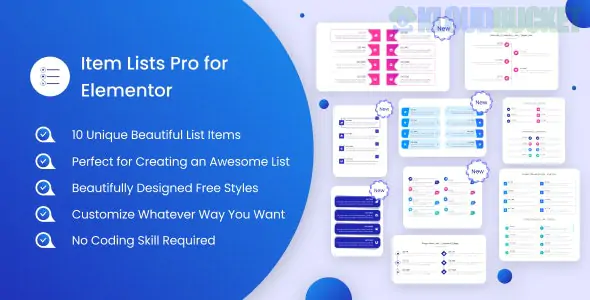
Item Lists Pro for Elementor is a specialized widget pack designed by techeshta to extend the standard bullet list capabilities of WordPress. While the native Elementor "Icon List" is functional, this plugin provides a higher tier of visual polish, offering 10+ professional, animated list styles that are perfect for feature highlights, step-by-step guides, or timelines.
It is available as both a free version on WordPress.org and a Pro version on CodeCanyon/Envato Elements.
10+ Ready-made Styles: Includes unique layouts such as Material Bullets, Shape Bullets, Timelines, and Gradient Ordered Bullets.
Smooth Animations: Projects an "editorial" feel with entry animations and hover effects that make list items glide or grow when interacted with.
Highly Customizable Bullets: You aren't limited to standard dots. You can use Icons, Images, Lottie Animations, or SVGs as your list markers.
Dynamic Layouts: Supports both vertical and horizontal orientations, allowing you to use lists for service sections or process maps.
Box Shadows & Borders: Individual styling controls for each list item to create a "card" effect.
SEO & Speed Optimized: Built with clean code standards (CodeCanyon quality) to ensure it doesn't slow down your site.
The Pro version unlocks more advanced visual designs compared to the free version:
Style Name
Best Use Case
Alternate Timeline
Great for company history or "How it Works" sections.
Material Curve
A modern, rounded aesthetic for service feature lists.
Gradient Ordered
Numbers with vibrant backgrounds, perfect for "Top 5" lists.
Skew Ordered
Angular, sharp-edged designs for a technical or architectural look.
Shape Bullets
Custom markers like diamonds, squares, or circles with custom colors.
Elementor: Works with both the Free and Pro versions of the Elementor Page Builder.
WordPress: 4.4 or higher (fully tested on the latest 2024–2025 versions).
PHP: 8.0 or higher is recommended for the best performance.
Responsive: All list styles are fully mobile-responsive and adjust automatically for tablets and phones.
Installation: Upload the item-lists-pro-for-elementor.zip file via Plugins > Add New.
Edit with Elementor: Open any page and search for "Item Lists" in the widget panel.
Choose Your Style: Drag the widget onto your page and select your preferred layout from the dropdown menu (e.g., "Style 8: Gradient Service").
Add Items: Use the Repeater Field to add your text, descriptions, and custom icons.
Style Tab: Use the Style tab to fine-tune the Typography, Icon Size, Background Color, and Box Shadow for each individual card or the list as a whole.
The standard Elementor icon list can feel "flat." Item Lists Pro is designed for those who want their site to look custom-coded. By adding Timeline and Service Bullets, you can turn a boring text block into an interactive piece of content that keeps users engaged.
Would you like me to help you set up a Timeline layout for your "Our Story" page, or do you need help customizing the hover animations for your feature list?
Subscribe to access unlimited downloads of themes, videos, graphics, plugins, and more premium assets for your creative needs.
.jpg) Help Us to Buy More New Theme/Plugin
Help Us to Buy More New Theme/Plugin
Published:
Dec 25, 2025 17:13 PM
Category:
Author:
OtherLicense:
GPL v2 or LaterTags: