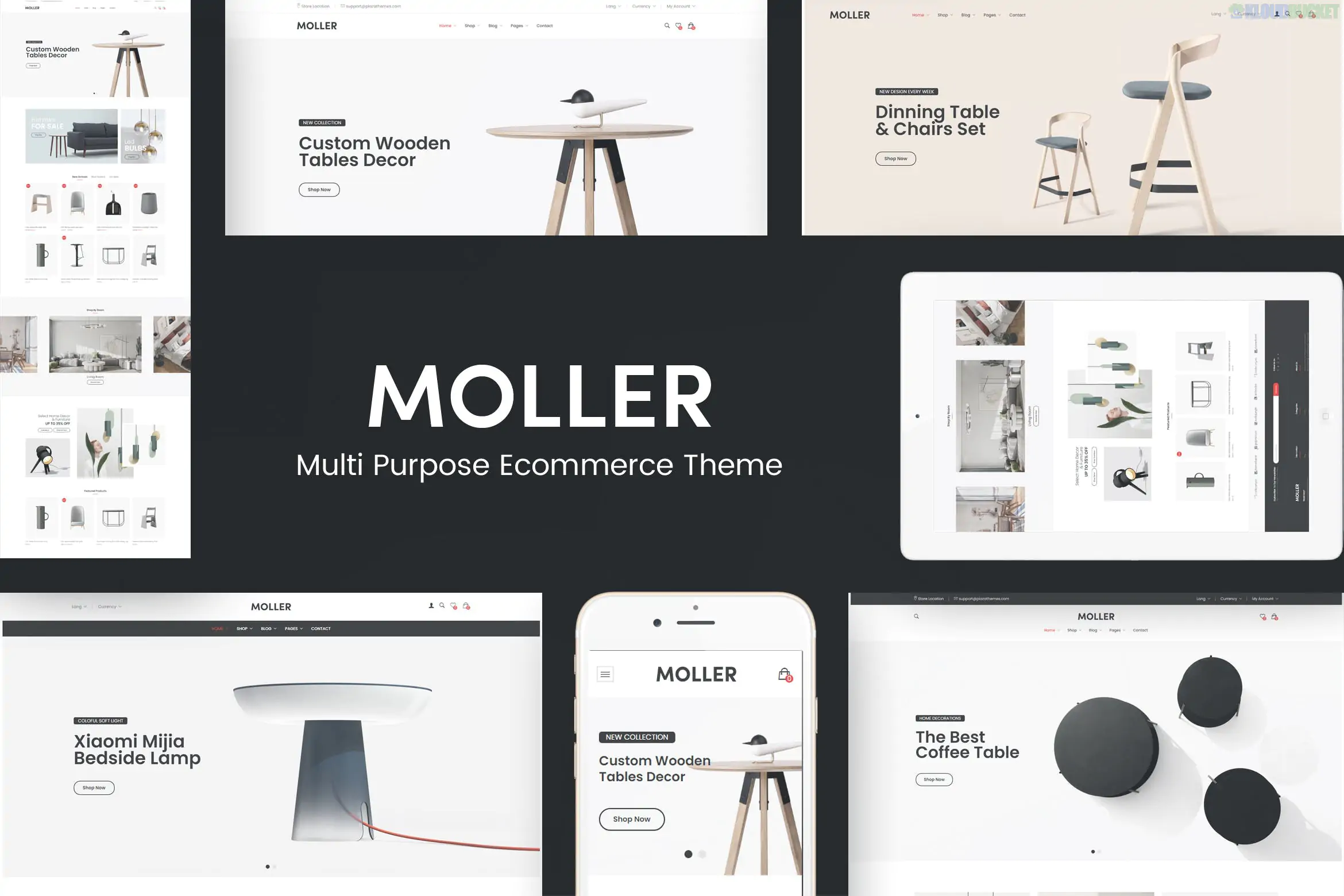
Moller is a premium, minimalist WordPress theme specifically engineered for furniture stores, interior design studios, and home decor boutiques. It is built on the WooCommerce framework and features a high-end, "clean-room" aesthetic that mimics world-class furniture catalogs.
Moller is designed to make high-ticket items look desirable through sophisticated layouts:
Product Variation Swatches: Allows customers to see different furniture fabrics, wood finishes, or colors directly on the shop page.
Minimalist WooCommerce Integration: Features "Quick View," "Wishlist," and AJAX search that don't clutter the elegant interface.
Interior Design Lookbooks: Specialized templates to show how different pieces of furniture work together in a room.
Elementor Support: Comes with custom widgets for displaying product categories and promotional banners with high-fashion typography.
Retina Ready: Crucial for furniture, as customers want to see the grain of the wood and the texture of the upholstery.
In the furniture industry, a single product photo isn't enough; you need to sell the "lifestyle." Envira Gallery is the perfect engine to power Moller’s visual storytelling.
Moller focuses on minimalism, and Envira’s Justified Layout complements this by creating a perfectly aligned, edge-to-edge grid of room setups.
The Benefit: Use the Zoom Addon so potential buyers can hover over a "Living Room" shot to see the fine stitching on a sofa or the finish on a coffee table without leaving the page.
You can turn an inspiration gallery into a sales machine.
The Strategy: Use Envira's Metadata/URL feature to link individual items within a "Room Photo" directly to their respective WooCommerce product pages. If a user likes a lamp in a gallery photo, clicking it takes them straight to the "Add to Cart" page.
If your business offers interior design or home staging, use Envira to show your transformations.
The Setup: Use a side-by-side Masonry Layout to show a "Empty Room" vs. a "Furnished by Moller" room. This provides immediate visual proof of your design value.
Furniture is tactile. Use the Envira Video Addon to include 360-degree video rotations of your best-selling pieces directly in the image gallery. Seeing a chair from every angle in a smooth lightbox increases buyer confidence significantly.
Match the "Scandi" Palette: Moller often uses whites, light greys, and natural wood tones. In Envira Gallery > Settings, choose the "Subtle" theme and set the lightbox background to white with 95% opacity. This makes the gallery feel like a native part of the Moller theme.
Enable Lazy Loading: High-res furniture photography can be extremely heavy. Enable Lazy Loading in Envira to ensure your "New Arrivals" page stays fast, which is critical for mobile shoppers.
Social Sharing for Pinterest: Furniture shoppers live on Pinterest. Enable the Social Sharing Addon so every "Room Inspiration" photo has a "Pin It" button, driving high-intent traffic back to your Moller store.
Feature
Moller Default
Envira Gallery
Grid Precision
Standard
Pixel-perfect Justified/Masonry
Mobile Experience
Basic
Touch-enabled swiping and zooming
Sales Conversion
View only
Link images directly to Shop products
Media Mix
Images only
Photos + 360° Video Integration
Would you like me to help you create a "Shoppable Room" gallery in Envira that links your furniture photos directly to your Moller/WooCommerce checkout?
Subscribe to access unlimited downloads of themes, videos, graphics, plugins, and more premium assets for your creative needs.
.jpg) Help Us to Buy More New Theme/Plugin
Help Us to Buy More New Theme/Plugin
Published:
Dec 29, 2025 12:35 PM
Version:
v1.0.3
Category:
Developer:
ThemeforestLicense:
GPL v2 or Later