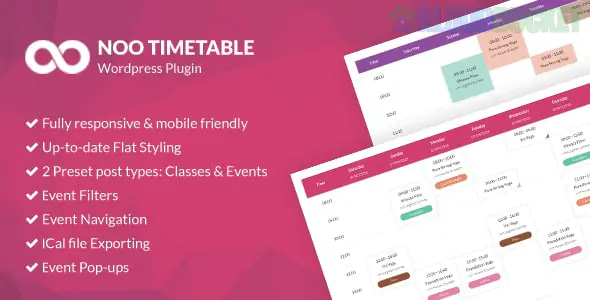
Noo Timetable is a popular WordPress plugin designed for businesses that need to display schedules, such as gyms (for fitness classes), schools, medical clinics, or event venues.
Unlike standard "calendar" plugins that show dates on a grid, Noo Timetable focuses on weekly or daily schedules, showing exactly when specific sessions or events occur.
Responsive Design: The timetable automatically adjusts for mobile screens, ensuring users can view class schedules on their phones without horizontal scrolling.
Auto Sync: A standout feature that allows the plugin to pull data from external sources like Google Calendar or Apple Calendar (iCal). This means you can update your personal calendar, and the website timetable updates automatically.
Event Filtering: Users can filter the schedule by category, instructor, location, or time of day. This is helpful for large gyms or multi-room venues.
Visual Pop-ups: Clicking an event can trigger a pop-up (with 16 different style options) showing more details, such as a class description or the trainer's bio, without leaving the page.
Booking Integration: It includes basic features for online booking and attendee registration, allowing clients to reserve a spot in a class directly from the timetable.
Feature
Noo Timetable
Standard Event Calendar
Primary View
Weekly/Daily "Time Slots"
Monthly Grid
Best For
Recurring classes, lessons, shifts
One-off events, conferences
Navigation
Easy "Next/Previous" week toggle
Month-to-month jumps
Styling
Highly customized for fitness/yoga
Traditional blog/news style
Visual Composer/Elementor Compatible: It integrates well with popular page builders.
Customization: You have full control over colors for different categories (e.g., "Yoga" is blue, "HIIT" is red).
iCal Export: Users can export a specific class or the entire schedule to their personal calendar with one click.
Are you planning to sync this with a specific external calendar (like Google or Outlook), or do you need help setting up the manual class schedule first?
Subscribe to access unlimited downloads of themes, videos, graphics, plugins, and more premium assets for your creative needs.
.jpg) Help Us to Buy More New Theme/Plugin
Help Us to Buy More New Theme/Plugin
Published:
Jan 05, 2026 19:25 PM
Version:
v2.2.0
Category:
Author:
OtherLicense:
GPL v2 or Later