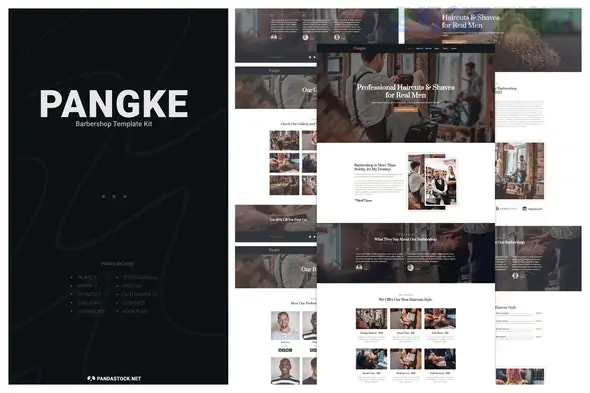
Pangke is a premium Elementor Template Kit designed for barbershops, hair salons, and grooming studios. It trades the technical, clean lines of the industrial kits (like Duha) for a "Gentleman’s Club" aesthetic—featuring dark tones, classic typography, and a layout optimized for local service conversion.
Here is the setup and strategy guide for the Pangke kit.
Pangke focuses heavily on visual storytelling and ease of booking. It typically includes:
High-Impact Hero Sections: Designed to showcase your best "fade" work or interior shop vibe immediately.
Service Menu & Pricing: Specialized layouts for "Haircut & Beard," "Straight Razor Shaves," and "Kids' Cuts."
Barber Profiles: Individual sections to introduce your team, helping clients choose their favorite stylist.
Gallery/Portfolio: Grid layouts to show off a lookbook of recent haircuts.
Booking Integration: While the kit provides the design for a booking section, it usually includes a MetForm template for inquiries.
Pangke is designed to be efficient, often requiring only Free Plugins to function (though Elementor Pro is always a plus for more control).
Elementor (Free Version): The primary builder.
ElementsKit Lite: Used for the header, footer, and advanced "Service" widgets.
MetForm: For the appointment request forms.
Jeg Elementor Kit: Often used for specific "Barber" style widgets like price lists or image hotspots.
Hello Elementor Theme: The recommended "blank canvas" theme.
Preparation: Install Hello Elementor and the Envato Elements plugin.
Import: Upload the pangke-kit.zip via Elements > Installed Kits.
Requirements: Click the orange "Install Requirements" button to automatically add the necessary free plugins.
Global Styles First: Always import the Global Kit Styles before any pages. This ensures the "Pangke" color palette (often dark grays, wood tones, or classic blacks) applies correctly.
Page Creation: Create a new page, set the layout to Elementor Full Width, and import the "Home" template.
Local SEO: Replace the placeholder map with your actual shop location. Barbershops live and die by local "near me" searches.
Booking Button: If you use a third-party booking app (like Booksy, Squire, or Vagaro), replace the MetForm button with a direct link to your booking portal.
Mobile First: Most of your clients will book while on their phones. Ensure the "Call Now" or "Book Now" buttons are easily clickable in the mobile preview of Elementor.
Instagram Sync: Consider adding an Instagram feed widget (like Happy Addons or Essential Addons) to show your live, daily cuts alongside the static kit gallery.
Would you like me to help you write the "About Us" story for your shop, or are you looking for a recommendation on the best WordPress booking plugin to pair with this design?
Subscribe to access unlimited downloads of themes, videos, graphics, plugins, and more premium assets for your creative needs.
.jpg) Help Us to Buy More New Theme/Plugin
Help Us to Buy More New Theme/Plugin
Published:
Feb 02, 2026 09:52 AM
Category:
Author:
OtherLicense:
GPL v2 or Later