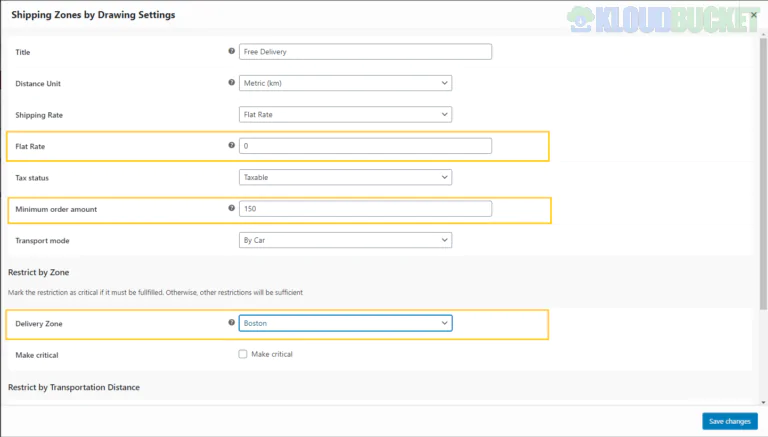
The **Shipping Zones by Drawing for WooCommerce** plugin (by Arosoft) is a specialized tool for businesses that need to define delivery areas more precisely than standard postal codes allow. It is particularly popular for local delivery services like restaurants, florist shops, or furniture movers.
Instead of listing zip codes, you physically **draw a polygon on a Google Map** to define where you ship.
---
### Core Functionality
* **Visual Boundary Creation:** You can draw custom shapes (polygons) on a map in the WordPress admin. Any address falling inside that shape qualifies for the assigned shipping rate.
* **No Zip Code Limitations:** Ideal for areas where a single zip code is too large or where delivery boundaries cut through the middle of a neighborhood.
* **Distance-Based Rates:** It can calculate shipping costs dynamically based on the driving distance from your store to the customer.
* **Interactive Checkout Map:** Customers can drop a pin on a map at checkout to confirm their exact location, which is helpful for new developments or rural areas where Google Maps might struggle with a text address.
---
### Free vs. Pro Version
The plugin follows a "Freemium" model. While the free version on WordPress.org is functional, many advanced logistics features are locked behind the Pro version.
| Feature | Free Version | Premium Version |
| --- | --- | --- |
| **Zone Limit** | Limited to 5 zones | Unlimited zones |
| **Map Drawing** | Basic polygon drawing | Advanced shapes & radius circles |
| **Shipping Rates** | Flat rates only | Dynamic rates (cost per km/mile) |
| **Shipping Origins** | Single store location | Multiple shipping origins (warehouses) |
| **Conditions** | Basic zone matching | Min/Max order amounts per zone |
| **Pricing** | Free | Starting at ~$39/year |
---
### Critical Requirements
To use this plugin, you **must** have a **Google Maps API Key**. Because the plugin uses several Google services (Maps JavaScript, Places, Geocoding, and Directions), you will need to:
1. Create a project in the Google Cloud Console.
2. Enable billing (though Google provides a $200 monthly credit which usually covers low-to-medium traffic sites).
3. Generate and restrict an API key to your domain.
### Common Alternatives
If this plugin feels too complex or if you have trouble with the Google API setup, developers often look at:
* **Kikote (Location Picker):** Very similar functionality with a focus on a highly polished checkout map experience.
* **WooCommerce Distance Rate Shipping:** The official extension for simple distance-based calculations without the drawing interface.
**Would you like me to guide you through the Google Maps API setup requirements for this plugin, or are you looking for a manual code alternative?**
Subscribe to access unlimited downloads of themes, videos, graphics, plugins, and more premium assets for your creative needs.
.jpg) Help Us to Buy More New Theme/Plugin
Help Us to Buy More New Theme/Plugin
Published:
Dec 29, 2025 16:37 PM
Version:
v2.8.12
Category:
Author:
OtherLicense:
GPL v2 or LaterTags:

![WooCommerce Binary Multi Level Marketing [MLM] 2.0.0](https://pub-9527534656ad43fc89ba1fea2f73e52a.r2.dev/files/items/Ahw2RZcZ9cnrmdT_1762312718.webp)