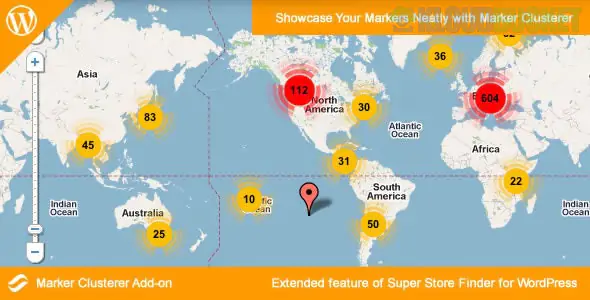
The Marker Clusterer Add-on for the Super Store Finder WordPress plugin is a performance and visualization tool designed for sites that display a high volume of locations. When you have hundreds or thousands of markers in a small area, the map can become cluttered and slow; this add-on solves that by grouping nearby markers into "clusters."
Performance Optimization: Reduces the browser's workload by only rendering a few "cluster" icons instead of hundreds of individual markers.
Visual Clarity: Replaces overlapping markers with a single circle containing the number of stores in that area. As the user zooms in, the clusters automatically break apart into individual locations.
Better User Experience (UX): Prevents the map from looking "messy" and allows users to quickly identify high-density areas of your business.
Feature
Description
Automatic Grouping
Markers are automatically calculated and grouped based on the current zoom level.
Custom Styling
You can often customize the colors and styles of the cluster icons to match your site's branding.
Toggle On/Off
Easily enable or disable the clustering effect from the Super Store Finder settings.
Full Compatibility
Works seamlessly with other add-ons like Multi-Category or Distance Radius.
To use this add-on, you must already have the core Super Store Finder for WordPress plugin installed.
Purchase & Download: Get the ssf-marker-cluster-wp.zip file from the official source (usually CodeCanyon).
Upload to WordPress: Go to Super Store Finder > Add-ons in your WordPress dashboard.
Activate: Click the Upload button, select your zip file, and once uploaded, ensure the status toggle is set to "ON."
Refresh: Clear your website and browser cache to see the new clustering effect on your live map.
[!NOTE]
If you are using a very old version of the plugin, ensure you have your Google Maps API key correctly configured, as clustering relies on the Google Maps JavaScript library.
Would you like me to help you troubleshoot a specific issue with the clusters not appearing, or do you need help customizing the cluster colors?
Subscribe to access unlimited downloads of themes, videos, graphics, plugins, and more premium assets for your creative needs.
.jpg) Help Us to Buy More New Theme/Plugin
Help Us to Buy More New Theme/Plugin
Published:
Jan 13, 2026 15:56 PM
Version:
v2.4
Category:
Author:
OtherLicense:
GPL v2 or Later