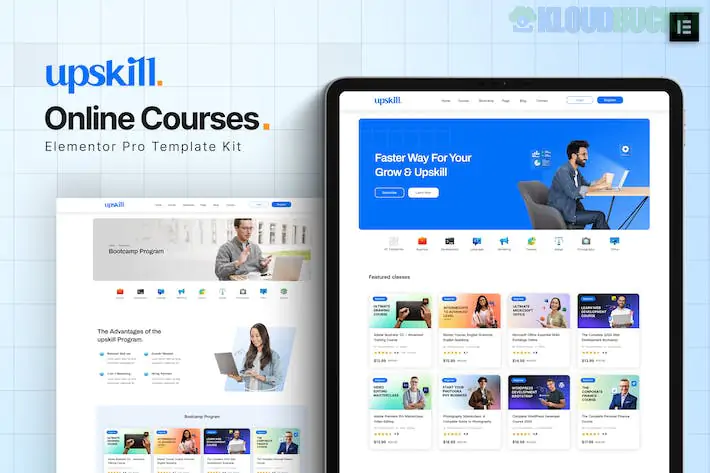
Upskill is a premium Elementor Pro Template Kit specifically crafted for the education sector, including online learning platforms, LMS (Learning Management Systems), and digital skill development centers. Released by onecontributor, it provides a clean, academic, and high-performance design that prioritizes course discoverability and user engagement.
By late 2025, it has become a standard for "Skill-Up" websites due to its seamless integration with professional e-learning tools and its "mobile-first" navigation.
10+ Pre-designed Templates: Includes essential page layouts for a full educational portal:
Homepage: A professional entry point with course categories and featured instructors.
Course Details: A technical layout designed to show curriculums, pricing, and enroll buttons.
Instructor Page: Clean grids to showcase your teaching staff and their credentials.
Webinar & Event Layouts: Sections to promote live digital training or academic schedules.
Elementor Pro Theme Builder: Fully utilizes the Theme Builder to create dynamic headers, footers, and archive pages that automatically pull in new course data.
Retina Ready & Fluid Responsive: Optimized for high-resolution displays and meticulously tested on mobile devices for students who learn on the go.
Global Kit Styles: One-click customization for your entire brand’s color palette and typography.
Flexbox Container Optimized: Built with modern Elementor architecture (2024-2025) for ultra-fast loading and improved SEO rankings.
Feature
Details
Developer
onecontributor
Type
Elementor Pro Template Kit
Base Theme
Hello Elementor (Highly Recommended)
Required Plugins
Elementor Free, Elementor Pro, Jeg Elementor Kit
Last Update
Late 2024 (Maintained for WP 6.7+ and PHP 8.3)
Design Style
Clean, Modern, Academic, Professional
Since this is an Elementor Pro kit, it requires a specific workflow to ensure all dynamic elements function correctly:
Preparation: Install and activate the Hello Elementor theme. Ensure Elementor Pro is active and connected.
Plugin Setup: Install the Envato Elements plugin (free) to handle the import process.
The Import:
Go to Elements > Installed Kits and upload your Upskill zip file.
Import Global Kit Styles first. This establishes the visual foundation of the site.
Import individual templates one by one in the order provided (Home, About, Course Detail, etc.).
Theme Builder: If the header and footer don't appear, go to Templates > Theme Builder to verify the "Display Conditions" are set to Entire Site.
Online Academies: For selling specialized technical or business courses.
Corporate Training Portals: Providing professional development resources to employees.
Individual Coaches & Mentors: Building a personal brand as an industry expert.
University Departments: Creating dedicated landing pages for specific academic programs.
Pro Tip: In 2026, Interactive Learning is key. While Upskill provides the design, you should pair it with a dedicated LMS plugin like LearnDash or Tutor LMS. You can easily place the LMS "Course Purchase" shortcodes into the Upskill "Course Detail" template to create a seamless, high-converting checkout experience.
Would you like me to find a tutorial on connecting Upskill with Tutor LMS so you can manage student enrollments and certificates directly?
How to Create an Online Course Website with Elementor
This video provides an excellent visual guide on building a complete education platform, which perfectly complements the setup of a high-end kit like Upskill.
Subscribe to access unlimited downloads of themes, videos, graphics, plugins, and more premium assets for your creative needs.
.jpg) Help Us to Buy More New Theme/Plugin
Help Us to Buy More New Theme/Plugin
Published:
Dec 17, 2025 16:05 PM
Category:
Author:
OtherLicense:
GPL v2 or Later