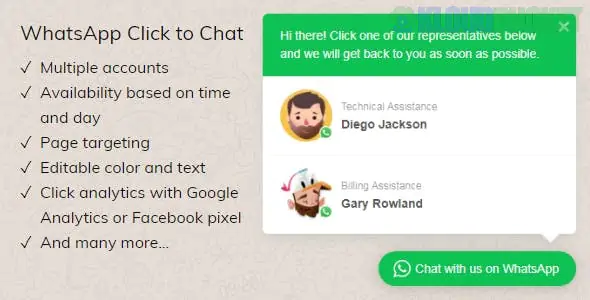
A WhatsApp Click to Chat plugin is one of the most effective ways to boost conversion rates on a WordPress site. It allows visitors to start a conversation with you in one click, shifting the dialogue from a website to an app they already use and trust.
As of 2026, these plugins have evolved from simple "buttons" into sophisticated support and marketing tools.
Plugin
Best For
Key "Pro" Feature
Click to Chat (HoliThemes)
Speed & Simplicity
Greetings Form: Collect names/emails before the chat starts.
Joinchat
WooCommerce
Dynamic Product Info: Automatically includes product price/URL in the first message.
WPChat
User Experience
Floating Dashboards: Supports multiple agents and a built-in FAQ section.
While free versions usually provide a simple floating button, the Pro/Premium versions (typically ranging from $18–$49/year) unlock business-grade tools:
Multi-Agent Support: Display a list of different departments (e.g., Sales, Tech Support) so users can choose the right person.
Business Hours: Automatically hide the button or show an "offline" message when your team is away.
Page-Level Targeting: Show a specific "Sales" button on product pages and a "Support" button on your documentation pages.
Analytics Integration: Tracks every click as an "Event" in Google Analytics 4 (GA4) or Meta Pixel to see which pages generate the most leads.
Pre-filled Messages: Craft custom starting messages like: "Hi, I'm interested in the [Product Name] I saw on your site!" ---
For a Personal Blog: Use the free version of Click to Chat. It’s lightweight and takes 30 seconds to set up with just your phone number.
For an Online Store: Use Joinchat. Its ability to pull WooCommerce data into the WhatsApp message saves your customers from having to explain what they are looking at.
For an Agency: Use WP Social Ninja or Chaty. These allow you to combine WhatsApp with other channels (Instagram, Telegram, and TikTok) into a single floating widget.
To ensure your chat button doesn't hurt your Core Web Vitals (site speed scores):
Choose a plugin that supports Asynchronous Loading (like Click to Chat).
Use the official WhatsApp brand assets provided within the plugin to ensure users recognize the button immediately.
Check Mobile vs. Desktop: Some plugins allow you to use https://wa.me/ for mobile (which opens the app) and https://web.whatsapp.com/ for desktop users.
Would you like me to help you write a custom "Pre-filled Message" that uses dynamic variables like the page title or product price?
Subscribe to access unlimited downloads of themes, videos, graphics, plugins, and more premium assets for your creative needs.
.jpg) Help Us to Buy More New Theme/Plugin
Help Us to Buy More New Theme/Plugin
Published:
Jan 02, 2026 15:45 PM
Version:
v2.2.12
Category:
Author:
OtherLicense:
GPL v2 or Later