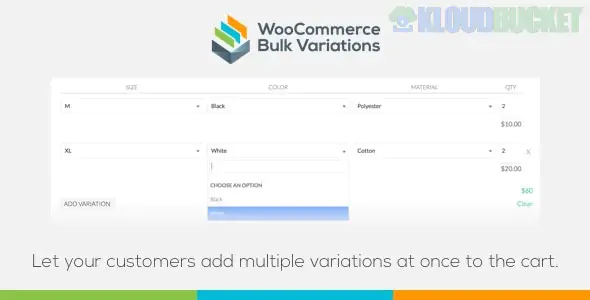
There are several plugins with similar names, but the most prominent "WooCommerce Bulk Variations" tool is the one developed by **Barn2**. It serves two primary purposes: helping shop owners **manage** variations faster in the backend and helping customers **buy** them faster in the frontend.
---
### 🚀 Key Features for Customers (Frontend)
This plugin is perfect for wholesale, B2B, or high-volume stores (like apparel or electronics) where customers need to buy multiple sizes or colors at once.
* **Bulk Order Grid:** Replaces the standard "Select Option" dropdowns with a matrix-style grid. For example, sizes (S, M, L) can be rows and colors (Red, Blue) can be columns.
* **Massive Time Saver:** Customers can enter quantities for 10 different variations and click "Add to Cart" just once, rather than repeating the process 10 times.
* **3+ Attributes Support:** Unlike most grid plugins that only handle two dimensions (X and Y), Barn2's version can handle 3 or more attributes by adding extra selectors above the grid.
* **Price Matrix:** It can display a simple price table for information-only purposes if you don't want the "Add to Cart" functionality enabled.
---
### 🛠 Key Features for Admins (Backend)
Managing 50 variations of a single product is usually a nightmare in standard WooCommerce. This plugin adds "Power Tools" to the **Product Data > Variations** tab:
* **Advanced Filters:** Instantly filter your variation list by specific attributes (e.g., "Show me only 'Blue' variations") or stock status.
* **True Bulk Editing:** Select multiple variations and apply changes only to those selected.
* *Example:* Increase the price of all "XL" shirts by $5 in one click.
* **Bulk Image Upload:** Apply a single image to all selected variations simultaneously.
* **Inventory Control:** Toggle "Manage Stock" or change stock levels for a specific subset of variations without touching the others.
---
### 📄 Comparison: Which "Bulk Variations" are you looking for?
Because the name is common, you might be looking for one of these alternatives:
| Plugin Name | Best For... | Key Difference |
| --- | --- | --- |
| **Barn2 Bulk Variations** | Wholesale & Management | Grid ordering + Advanced backend filtering. |
| **WooCommerce Bulk Variation Forms** | Simple B2B | Specifically for 2-attribute products (Official WC extension). |
| **Bulk Variation & Swatches** | Visuals | Focuses on adding color swatches and "Management Rules." |
| **Smart Bulk Variations** | Layouts | Offers "List," "Table," and "Attribute" views for the frontend. |
---
### 🚀 Quick Setup (Barn2 Version)
1. **Install & License:** Upload the plugin and enter your license key under *WooCommerce > Settings > Products > Bulk variations*.
2. **Enable for Product:** Go to any Variable Product, scroll to the "Product Data" section, and look for the **Bulk Variations** tab.
3. **Choose Layout:** Check "Enable bulk variations grid" and choose which attribute should be the rows and which should be the columns.
4. **Save:** Update the product, and your customers will now see the grid instead of dropdowns.
**Would you like me to show you how to set up the 3rd attribute selectors for complex products, or do you need help with a different "Bulk Variation" plugin?**
.jpg) Help Us to Buy More New Theme/Plugin
Help Us to Buy More New Theme/Plugin
Published:
Jan 17, 2026 13:44 PM
Category:
Author:
All In One PluginLicense:
GPL v2 or LaterTags: