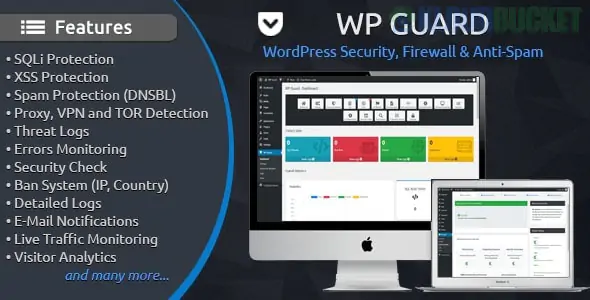
WP Guard (developed by Antonov_WEB) is a high-performance security and firewall plugin for WordPress that operates as a powerful Web Application Firewall (WAF). Unlike some "cloud-based" competitors, WP Guard is a self-hosted script that integrates directly into your WordPress installation to stop malicious requests before they reach your site's data.
WP Guard uses industrial-strength algorithms and intelligent pattern recognition to identify both known and "zero-day" (unknown) threats.
Web Application Firewall (WAF):
SQLi Protection: Blocks SQL Injection attempts aimed at your database.
XSS Protection: Stops Cross-Site Scripting vulnerabilities.
Headers Check: Inspects response headers of every visitor to deny suspicious objects.
Visitor & Proxy Shield:
Proxy/VPN/TOR Blocking: Identifies and blocks users hiding their real IP addresses behind proxies or VPNs.
Country Blocking: Allows you to ban specific countries from accessing your site entirely.
Anti-Spam & Bot Protection:
Spam Protection: Protects forms and comment sections from automated spammers.
Bad Bots & Crawlers: Blocks bots that waste your bandwidth or attempt to scrape your content.
Fake Bot Detection: Verifies if a "Googlebot" or "Bingbot" is actually real or a malicious fake.
Detailed Monitoring:
Live Traffic: Real-time dashboard to see who is visiting your site and what they are doing.
Threat Logs: A database of every blocked attack, including the attacker's IP, Browser, OS, and Location on a map.
The plugin includes a suite of utility tools that usually require separate plugins:
Login History: Tracks all successful and failed login attempts to monitor for brute-force attacks.
.htaccess Editor: Edit your server configuration file directly from the WordPress dashboard.
PHP Configuration Checker: Scans your server settings for potential security flaws.
Error Monitoring: Tracks PHP errors on your site so you can fix them before they cause downtime.
WP Guard is primarily sold as a premium plugin on marketplaces like CodeCanyon.
Regular License: Approximately $25 - $29 (one-time fee for lifetime updates).
GPL Versions: Often available on membership sites like Srmehranclub for around $4.99, though these lack direct support from the developer.
Feature
WP Guard
Wordfence
Sucuri
Firewall Type
Endpoint (PHP-based)
Endpoint (PHP-based)
Cloud-based (DNS)
Pricing
One-time Payment
Subscription ($119/yr)
Subscription ($199/yr)
Proxy/VPN Block
Included
Premium only
Premium only
Ease of Use
Very Simple
Complex/Granular
Intermediate
Pros:
Lightweight: Extremely optimized and won't slow down page load times.
Cost-Effective: No recurring monthly fees for pro features.
Integrated: Everything is managed inside your WordPress admin panel.
Cons:
Not Cloud-Based: Since it runs on your server, a massive DDoS attack could still overwhelm your server resources (unlike Sucuri).
Manual Whitelisting: If it blocks a legitimate user, you must manually whitelist their IP.
Would you like me to help you set up the "Auto Ban" feature for specific countries, or do you need a guide on how to whitelist your own IP address to prevent accidental lockouts?
Subscribe to access unlimited downloads of themes, videos, graphics, plugins, and more premium assets for your creative needs.
.jpg) Help Us to Buy More New Theme/Plugin
Help Us to Buy More New Theme/Plugin