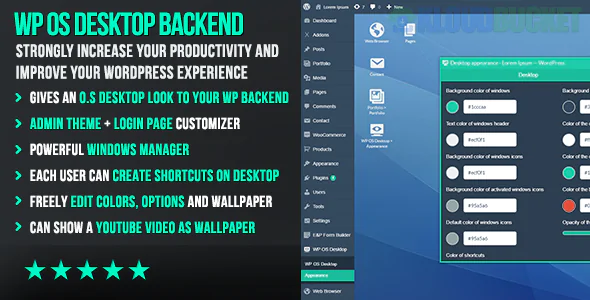
WP OS Desktop Backend is a transformative WordPress plugin that replaces the standard, linear admin dashboard with a fully functional window-based desktop interface.
Unlike traditional "Admin Themes" that simply change colors or fonts, this plugin reimagines the WordPress backend as a multi-tasking operating system environment.
The core value of WP OS Desktop Backend is its ability to turn WordPress into a SaaS-like application. Instead of clicking through menus and waiting for page reloads, you interact with the site as if it were a local computer.
In a standard WordPress setup, you can only work on one thing at a time (unless you open dozens of browser tabs). With this plugin:
You can open the Post Editor in one window.
Open the Media Library in another.
Keep your WooCommerce Orders or Analytics visible in a third.
Minimize and maximize windows just like Windows or macOS.
The interface includes familiar OS elements:
Taskbar: Manage open "apps" (plugins/menus).
Start Menu: A central hub to access all WordPress features.
Desktop Shortcuts: Pin your most-used sections (e.g., "New Post" or "WPForms") directly to the workspace.
Context Menus: Right-click functionality for faster actions.
If you build sites for clients, the standard WordPress dashboard can be overwhelming. WP OS allows you to:
White-label the entire backend.
Present your custom post types or specific tools as "Apps."
Hide the "WordPress feel" entirely, making the site feel like a custom-built software platform.
AJAX Powered: Most windows load content without a full page refresh, making the experience significantly faster than the native dashboard.
Compatibility: It is designed to work with most third-party plugins. When you open a plugin (like Yoast or Elementor), it simply renders that plugin's settings page inside an OS window.
Customization: You can change wallpapers, icon sets, and window styles to match your brand.
Pros
Cons
Productivity: Drastically reduces "tab clutter."
Learning Curve: Users used to classic WP may be confused.
Professionalism: Great for high-end client handoffs.
Performance: Requires a decent server as it loads multiple resources.
Organization: Better for sites with many custom features.
Edge Cases: Some plugins with non-standard CSS may look odd in windows.
Feature
Standard Admin Theme
WP OS Desktop Backend
UI Layout
Fixed Sidebar/Header
Floating Windows
Multitasking
Single Page
Multiple Windows
Speed
Standard Page Reloads
AJAX-based Loading
Feel
A Website
An Application
Would you like me to look up the current pricing/licensing for 2026, or would you prefer a list of alternative "App-style" admin plugins?
Subscribe to access unlimited downloads of themes, videos, graphics, plugins, and more premium assets for your creative needs.
.jpg) Help Us to Buy More New Theme/Plugin
Help Us to Buy More New Theme/Plugin
Published:
Jan 13, 2026 14:15 PM
Version:
v1.16
Category:
Author:
All In One PluginLicense:
GPL v2 or Later