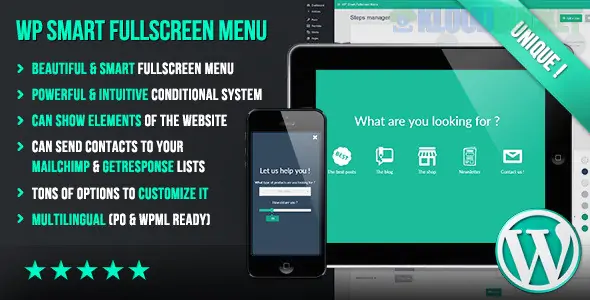
WP Smart Fullscreen Menu is a specialized navigation plugin designed to replace traditional headers with an immersive, full-screen overlay. While many menu plugins focus on "Mega Menus" (like UberMenu), this one focuses on conditional logic and a step-by-step user journey within the menu itself.
What separates this plugin from a standard hamburger menu is its "visual conditional system."
Conditional Logic: You can show different menu items or "steps" based on user interaction. For example, if a user clicks "Services," the menu can transition to a sub-page of specific service options without leaving the fullscreen overlay.
Multi-Step Navigation: Instead of a long list of links, you can guide users through a flow (e.g., Step 1: Select Category → Step 2: Select Service → Step 3: Contact Form).
Rich Content Support: Unlike standard WordPress menus that only allow text links, this plugin allows you to embed:
Images and Sliders
Search Bars
Shortcodes (for forms or maps)
Social Media Icons
Lead Generation: It integrates with MailChimp and GetResponse, allowing you to turn your navigation menu into a full-screen opt-in form or data collection tool.
The plugin is built to be a design statement rather than just a utility.
Animations: It offers various entry effects, such as fading, sliding from the top, or zooming from the center.
Trigger Options: You can use a dedicated floating "hamburger" button, or you can trigger the fullscreen menu by linking it to any existing button or link on your site.
Full Responsiveness: The overlay is designed to work seamlessly on mobile, often providing a better UX than cramped standard mobile menus.
If you are looking for a fullscreen experience but have different specific needs, here is how it compares to other popular options:
Plugin
Best For
Key Difference
WP Smart Fullscreen
Interactive Flows
Uses conditional logic to change content based on user clicks.
Responsive Menu Pro
Mobile Customization
Offers 150+ options specifically for hamburger/side-bar design.
UberMenu
Complex Content
Best for massive "Mega Menus" with columns and many links.
JetMenu
Elementor Users
Best for those who want to build menus using a drag-and-drop builder.
If you are using a Block Theme (FSE), check your theme's native "Navigation Block" first. Many modern themes now include a "Fullscreen" toggle for mobile/desktop. However, if you need the conditional logic or integrated MailChimp forms, a dedicated plugin like WP Smart Fullscreen Menu is still the superior choice.
Would you like me to help you find a tutorial on setting up conditional steps, or are you looking for a direct download link?
Subscribe to access unlimited downloads of themes, videos, graphics, plugins, and more premium assets for your creative needs.
.jpg) Help Us to Buy More New Theme/Plugin
Help Us to Buy More New Theme/Plugin
Published:
Jan 13, 2026 14:13 PM
Version:
v1.048
Category:
Author:
OtherLicense:
GPL v2 or Later